> ## Documentation Index
> Fetch the complete documentation index at: https://modelcontextprotocol.io/llms.txt
> Use this file to discover all available pages before exploring further.
# Protocol eras
> How the Inspector negotiates legacy vs. modern MCP, and how every feature is handled between protocol eras
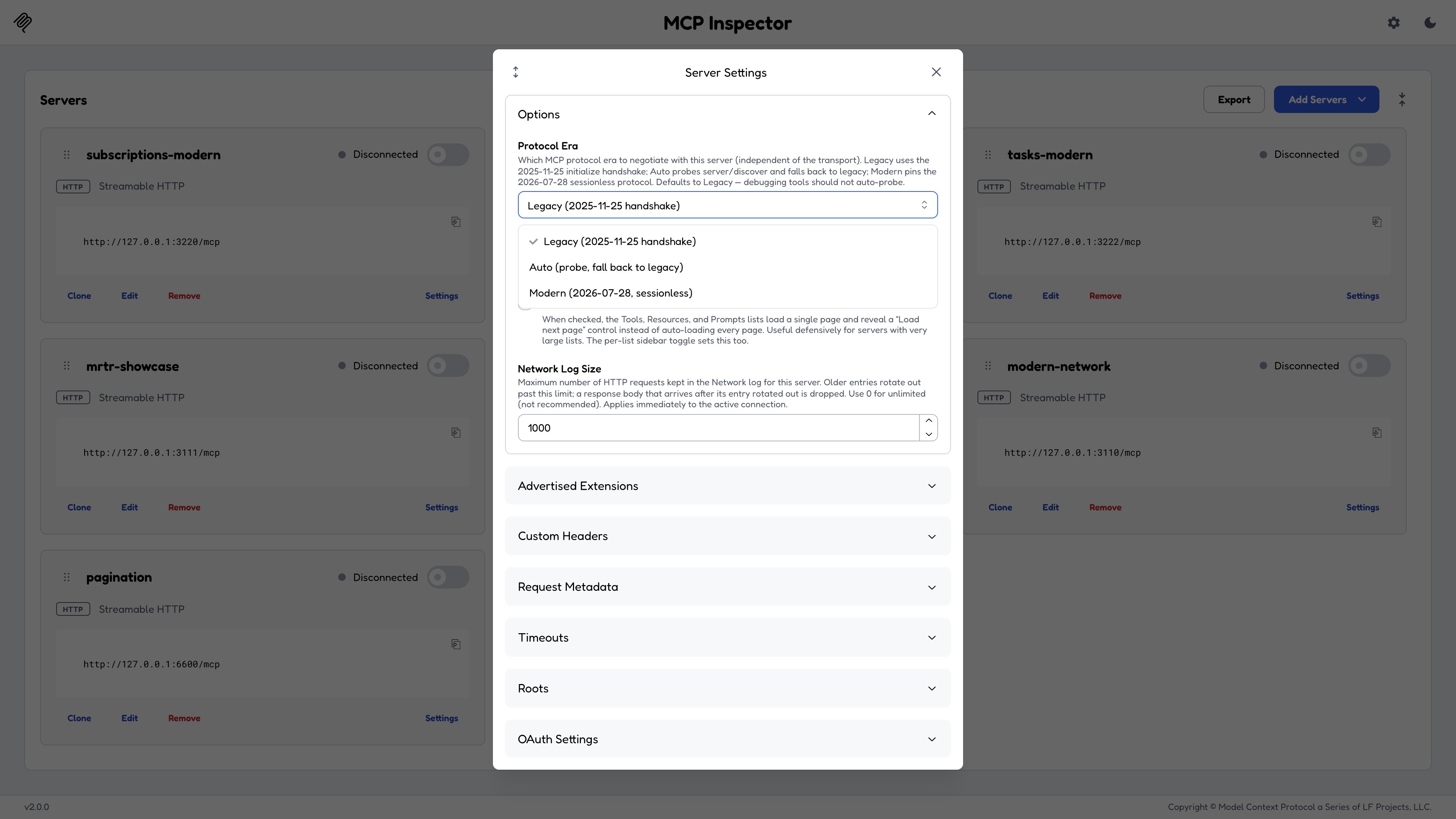
The 2026-07-28 revision of MCP made substantial changes to the protocol. The Inspector therefore treats **protocol era** (legacy or modern, meaning before or as of that revision) as a first-class, per-server setting, orthogonal to the transport: the same HTTP URL can be inspected as a legacy server or as a modern one. Several tabs render meaningfully different UI and traffic depending on which era is in effect.
## The `Protocol Era` setting
Each server carries a `protocolEra` of `legacy`, `auto`, or `modern`. In the web client it lives in **Server Settings**; in a catalog or config file it is the `protocolEra` field; in the CLI and TUI it comes from that same file.
| Era | What the Inspector does at connect |
| -------- | --------------------------------------------------------------------------------------- |
| `legacy` | **The default.** Plain `initialize`, no probing at all. |
| `auto` | Probe `server/discover` first, and fall back to `initialize` on any non-modern outcome. |
| `modern` | Pin exactly `2026-07-28`. No fallback, so a non-modern server fails loudly. |
**Why `legacy` is the default, and not `auto`.** A debugging tool must not
auto-probe. A `server/discover` probe stalls against silent legacy stdio
servers, and it pollutes the recorded transcript you came here to read. Opting
into `auto` or `modern` is a deliberate act, so what you see in the Protocol
tab is what your server would have seen from a client behaving the way you
configured.
Era selection works the same way in all three clients.
Once connected, the negotiated era is reported in the connection header and in **Connection Info**. On a modern connection, `server/discover` also supplies `capabilities` (including `extensions`), `instructions`, and the list of `supportedVersions`. The server's name and version arrive in the result `_meta` under `io.modelcontextprotocol/serverInfo`.
 ## Reproducing each era locally
Every section below ends with a **Reproduce with ...** pointer to a JSON config for one of the **composable test servers** shipped in the Inspector repository. Clone the repo, build the test servers, then point the Inspector at the config the section names.
```bash theme={null}
git clone https://github.com/modelcontextprotocol/inspector
cd inspector && npm install && npm run build
cd clients/web && npm run test-servers:build
```
***
## Logging
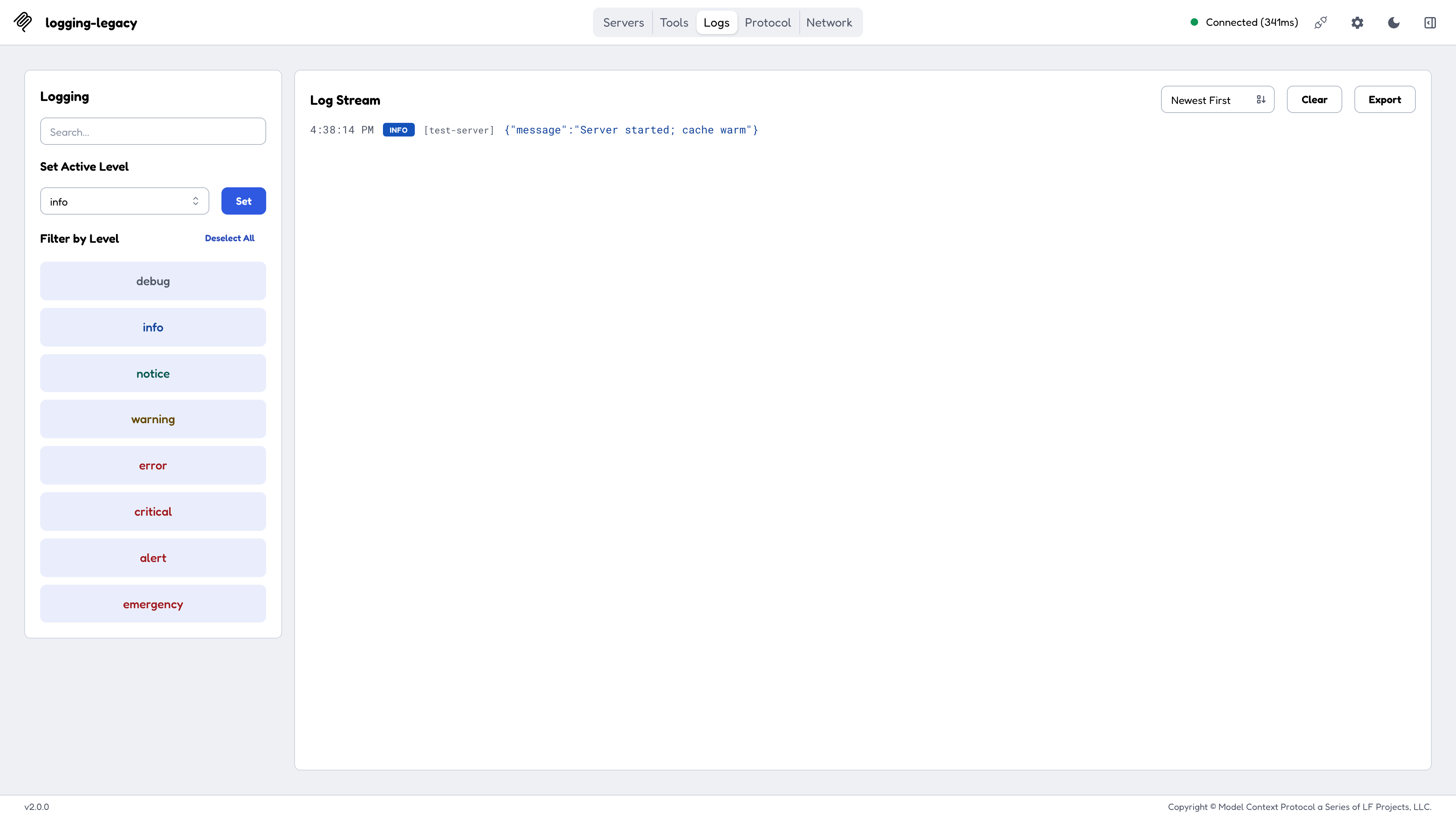
Logging is **session-scoped**. The client sends `logging/setLevel` once, and the server emits `notifications/message` at or above that level for the rest of the session.
The **Logs** tab shows a **Set Active Level** selector plus a **Set** button. Choose a level, click Set, and subsequent server logs stream into the panel.
Reproduce with `test-servers/configs/logging-legacy-http.json`.
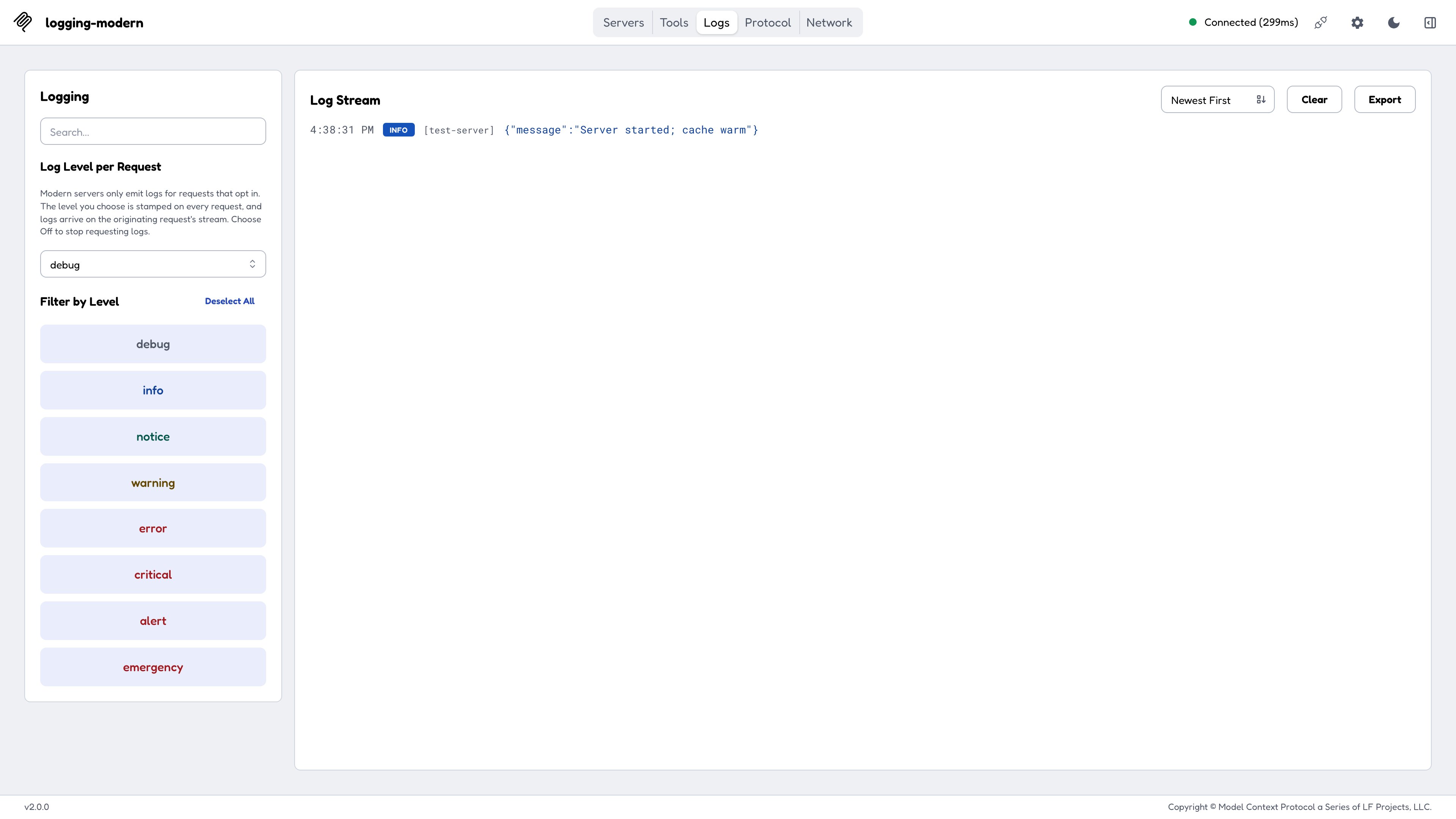
`logging/setLevel` is **gone**. Instead the client opts in **per request**, by stamping `_meta["io.modelcontextprotocol/logLevel"]` on each outgoing request. A server MUST NOT emit `notifications/message` for a request that did not opt in.
The **Logs** tab therefore shows a **Log Level per Request** control instead. Pick a level and every subsequent request carries the stamp, visible in the Network tab's request body. Logs emitted while handling a request ride that request's SSE response stream.
Set the control to **Off** and the `logLevel` key is omitted entirely, so the same tool call produces no logs at all. That silence is correct behavior, not a bug.
The per-server default is `debug` (opted in at the most verbose level, since the Inspector is a debugging tool); set `modernLogLevel: "off"` on a server to opt back out by default.
Reproduce with `test-servers/configs/logging-modern-http.json`.
## Reproducing each era locally
Every section below ends with a **Reproduce with ...** pointer to a JSON config for one of the **composable test servers** shipped in the Inspector repository. Clone the repo, build the test servers, then point the Inspector at the config the section names.
```bash theme={null}
git clone https://github.com/modelcontextprotocol/inspector
cd inspector && npm install && npm run build
cd clients/web && npm run test-servers:build
```
***
## Logging
Logging is **session-scoped**. The client sends `logging/setLevel` once, and the server emits `notifications/message` at or above that level for the rest of the session.
The **Logs** tab shows a **Set Active Level** selector plus a **Set** button. Choose a level, click Set, and subsequent server logs stream into the panel.
Reproduce with `test-servers/configs/logging-legacy-http.json`.
`logging/setLevel` is **gone**. Instead the client opts in **per request**, by stamping `_meta["io.modelcontextprotocol/logLevel"]` on each outgoing request. A server MUST NOT emit `notifications/message` for a request that did not opt in.
The **Logs** tab therefore shows a **Log Level per Request** control instead. Pick a level and every subsequent request carries the stamp, visible in the Network tab's request body. Logs emitted while handling a request ride that request's SSE response stream.
Set the control to **Off** and the `logLevel` key is omitted entirely, so the same tool call produces no logs at all. That silence is correct behavior, not a bug.
The per-server default is `debug` (opted in at the most verbose level, since the Inspector is a debugging tool); set `modernLogLevel: "off"` on a server to opt back out by default.
Reproduce with `test-servers/configs/logging-modern-http.json`.
 ***
## Resource subscriptions
Clicking **Subscribe** on a resource sends `resources/subscribe`. The Subscriptions section lists the URI with no stream chrome. When the resource changes, the server emits `notifications/resources/updated` and the subscribed tile's last-updated time is stamped.
Reproduce with `test-servers/configs/subscriptions-legacy-http.json`, which also serves an `update_resource` tool so you can drive the notification round-trip yourself.
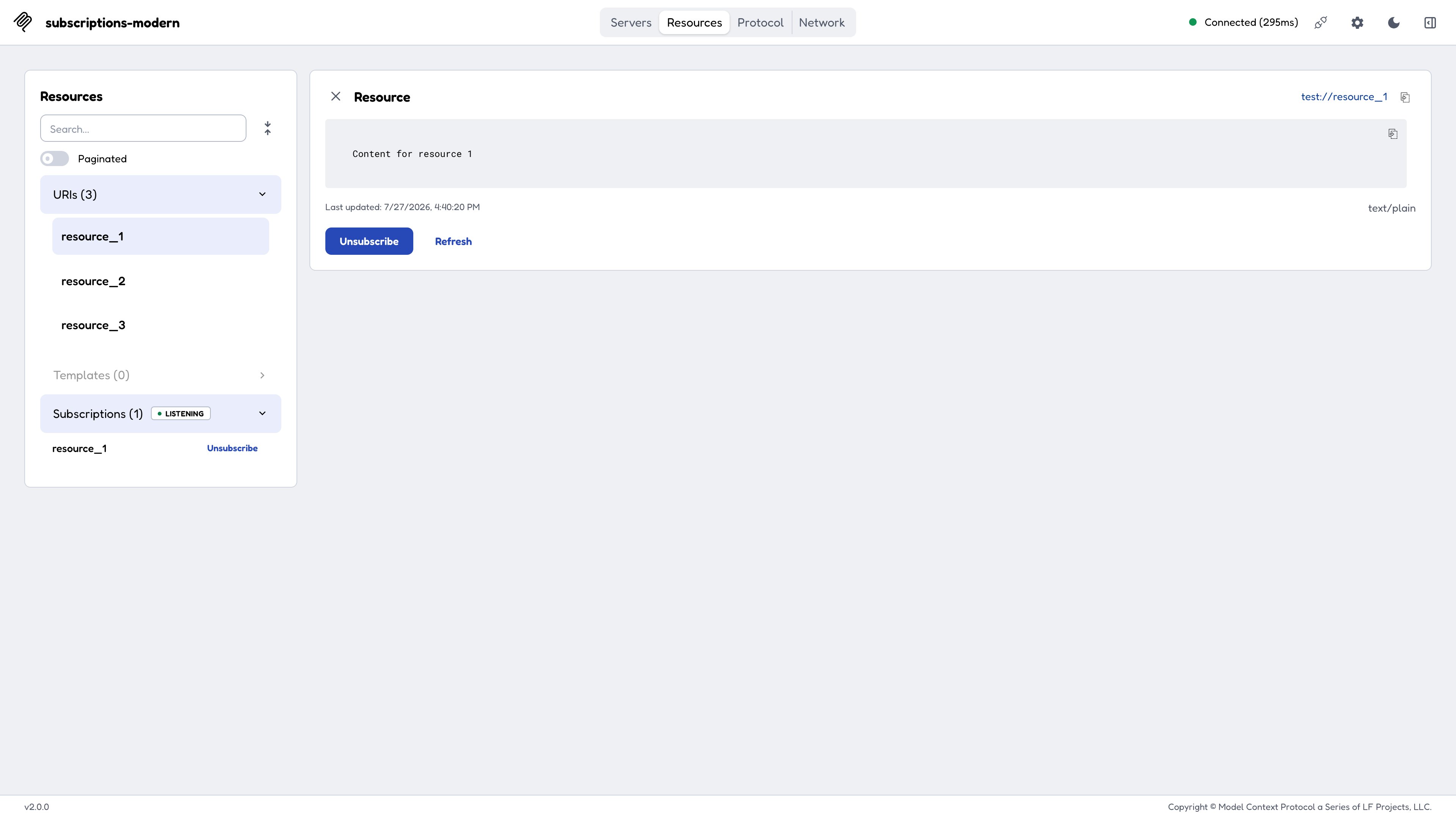
The same **Subscribe** button instead sends **`subscriptions/listen`**, with a filter carrying `resourceSubscriptions` plus the `resourcesListChanged` opt-in. The subscription is confirmed when the server sends `notifications/subscriptions/acknowledged`.
Because the subscription is now a long-lived stream rather than a session flag, the Subscriptions section grows a **stream-status badge** in its header that moves from `Connecting...` to `Listening`. If the stream drops, the Inspector reconnects by re-sending `subscriptions/listen`.
Reproduce with `test-servers/configs/subscriptions-modern-http.json`.
***
## Resource subscriptions
Clicking **Subscribe** on a resource sends `resources/subscribe`. The Subscriptions section lists the URI with no stream chrome. When the resource changes, the server emits `notifications/resources/updated` and the subscribed tile's last-updated time is stamped.
Reproduce with `test-servers/configs/subscriptions-legacy-http.json`, which also serves an `update_resource` tool so you can drive the notification round-trip yourself.
The same **Subscribe** button instead sends **`subscriptions/listen`**, with a filter carrying `resourceSubscriptions` plus the `resourcesListChanged` opt-in. The subscription is confirmed when the server sends `notifications/subscriptions/acknowledged`.
Because the subscription is now a long-lived stream rather than a session flag, the Subscriptions section grows a **stream-status badge** in its header that moves from `Connecting...` to `Listening`. If the stream drops, the Inspector reconnects by re-sending `subscriptions/listen`.
Reproduce with `test-servers/configs/subscriptions-modern-http.json`.
 ***
## Tasks
Tasks change the most between protocol eras, including *how the Inspector UI tab is gated*.
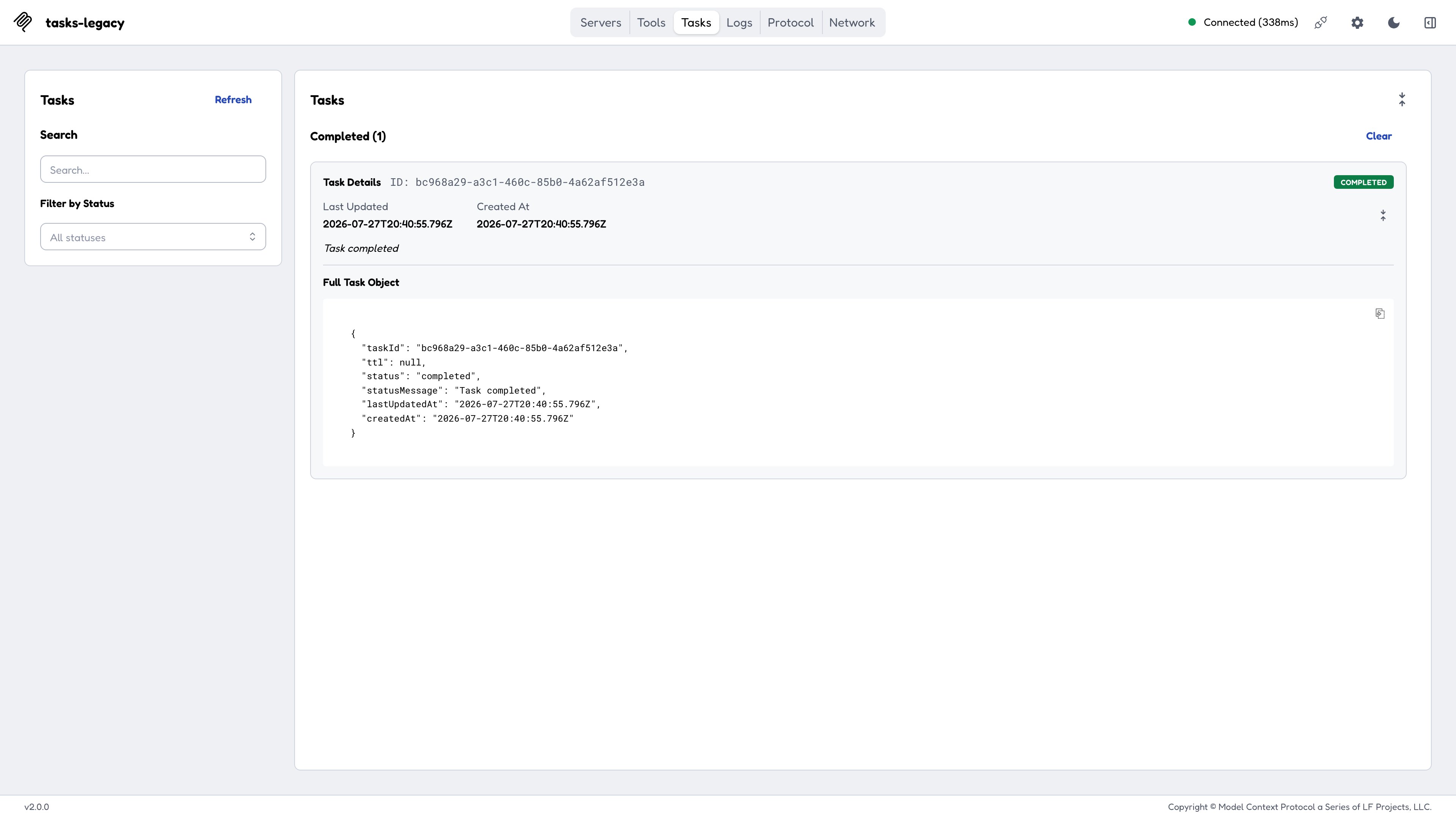
The **Tasks** tab appears when the server advertises `capabilities.tasks`. Run a tool with **Run as task** enabled and the tab lists it, populated by `tasks/list` and polled with `tasks/get`. The completed payload is fetched with a **blocking `tasks/result`**, and **Cancel** sends `tasks/cancel`.
Reproduce with `test-servers/configs/tasks-legacy-http.json`.
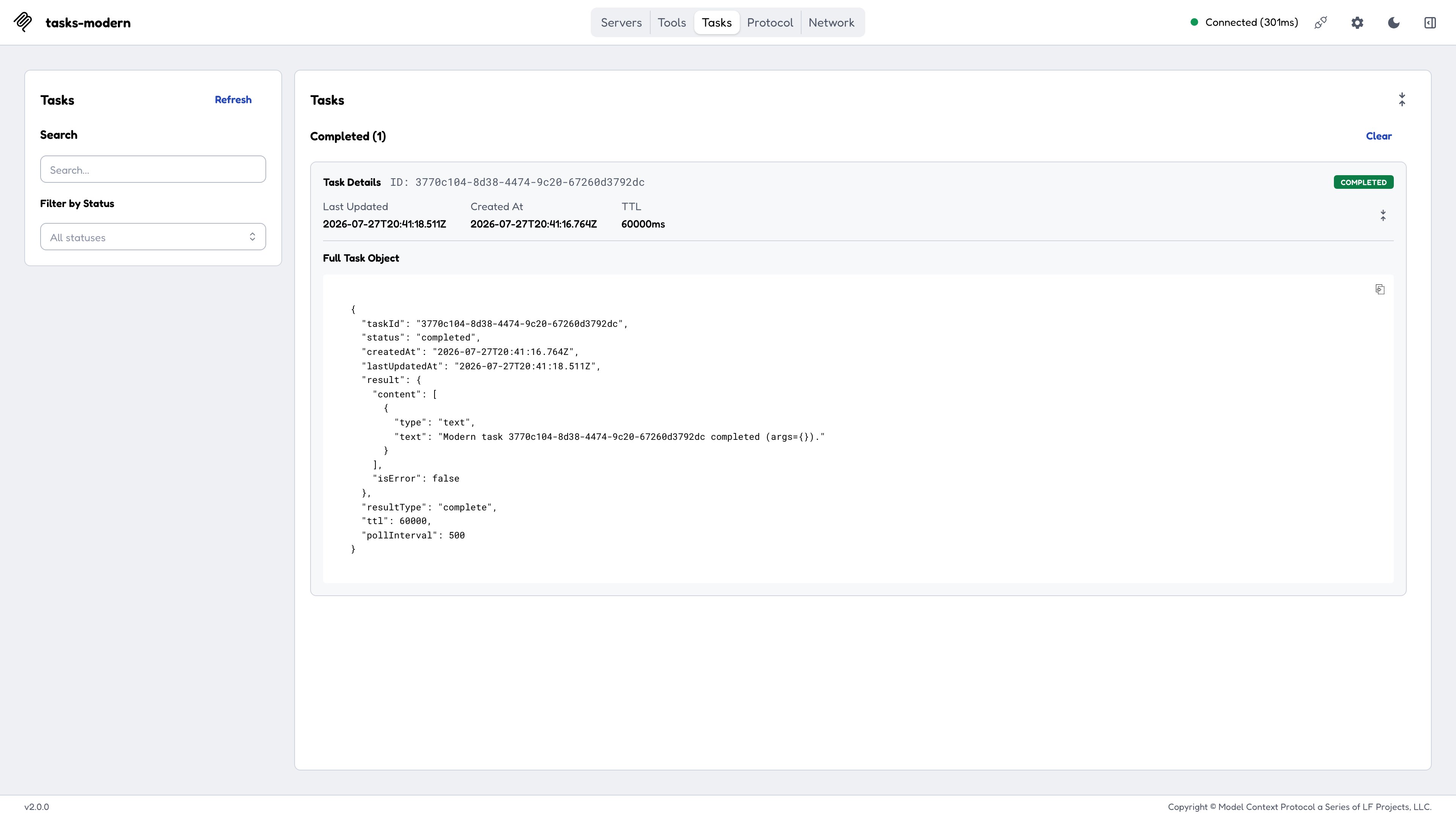
Tasks are an **extension** (`io.modelcontextprotocol/tasks`, [SEP-2663](/seps/2663-tasks-extension)), so the tab is gated on the *negotiated extension* rather than on `capabilities.tasks`.
Run a tool as a task and `tools/call` returns a `CreateTaskResult` (`resultType: "task"`, visible in the Protocol and Network tabs). The Inspector polls **`tasks/get`** only; there is no `tasks/list`, so **Refresh** re-polls the handles the client already knows about. A completed task **inlines its result**, with no blocking `tasks/result` call.
A task that needs more information moves to `input_required` and surfaces an embedded [elicitation](/specification/draft/client/elicitation) in the pending-request modal (the dialog the web client opens whenever a request is waiting on you). Answering it sends **`tasks/update`** carrying the `inputResponses`, and the next poll completes.
Reproduce with `test-servers/configs/tasks-modern-http.json` (tools `modern_task` and `modern_input_task`).
***
## Tasks
Tasks change the most between protocol eras, including *how the Inspector UI tab is gated*.
The **Tasks** tab appears when the server advertises `capabilities.tasks`. Run a tool with **Run as task** enabled and the tab lists it, populated by `tasks/list` and polled with `tasks/get`. The completed payload is fetched with a **blocking `tasks/result`**, and **Cancel** sends `tasks/cancel`.
Reproduce with `test-servers/configs/tasks-legacy-http.json`.
Tasks are an **extension** (`io.modelcontextprotocol/tasks`, [SEP-2663](/seps/2663-tasks-extension)), so the tab is gated on the *negotiated extension* rather than on `capabilities.tasks`.
Run a tool as a task and `tools/call` returns a `CreateTaskResult` (`resultType: "task"`, visible in the Protocol and Network tabs). The Inspector polls **`tasks/get`** only; there is no `tasks/list`, so **Refresh** re-polls the handles the client already knows about. A completed task **inlines its result**, with no blocking `tasks/result` call.
A task that needs more information moves to `input_required` and surfaces an embedded [elicitation](/specification/draft/client/elicitation) in the pending-request modal (the dialog the web client opens whenever a request is waiting on you). Answering it sends **`tasks/update`** carrying the `inputResponses`, and the next poll completes.
Reproduce with `test-servers/configs/tasks-modern-http.json` (tools `modern_task` and `modern_input_task`).
 ***
## Multi-round tool results (MRTR)
On the modern era a tool can return `input_required` instead of a final result, embedding an [elicitation](/specification/draft/client/elicitation), a [sampling](/specification/draft/client/sampling) request, or a [`roots/list`](/specification/draft/client/roots) request. The client answers that embedded request and retries the `tools/call` under a fresh JSON-RPC id until the call reaches `complete`.
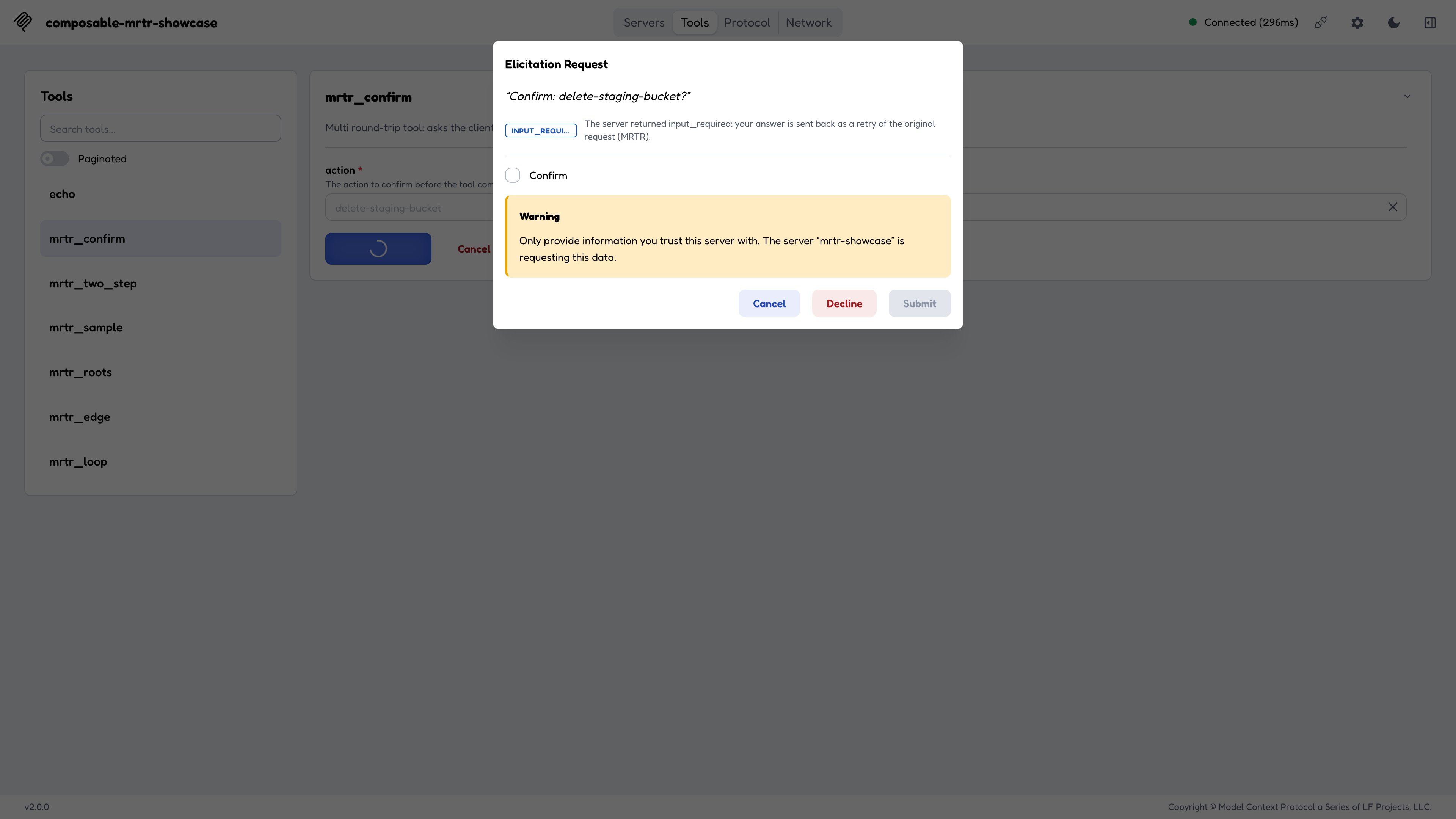
The Inspector drives MRTR **manually**, so each round pauses at the **pending-request modal**, tagged `input_required`, for you to answer. The Protocol view groups the whole exchange as one MRTR conversation rather than as unrelated calls.
`test-servers/configs/mrtr-showcase-http.json` bundles every shape in one modern server:
| Tool | What it exercises |
| --------------- | ----------------------------------------------------------------------------- |
| `mrtr_confirm` | A single elicitation round. |
| `mrtr_two_step` | Two elicitation rounds, threaded through `requestState`. |
| `mrtr_sample` | An embedded sampling request, routed to the Sampling panel. |
| `mrtr_roots` | An embedded `roots/list`, answered silently from configured roots (no modal). |
| `mrtr_edge` | An `inputRequests`-only round, then a `requestState`-only round. |
| `mrtr_loop` | Never completes, so the client stops at its `MRTR_MAX_ROUNDS` limit. |
The legacy `collect_elicitation` pattern (a server calling
`server.elicitInput`) **errors** on a 2026-07-28 connection, because
server-to-client requests aren't allowed there. MRTR is its modern
replacement.
***
## Multi-round tool results (MRTR)
On the modern era a tool can return `input_required` instead of a final result, embedding an [elicitation](/specification/draft/client/elicitation), a [sampling](/specification/draft/client/sampling) request, or a [`roots/list`](/specification/draft/client/roots) request. The client answers that embedded request and retries the `tools/call` under a fresh JSON-RPC id until the call reaches `complete`.
The Inspector drives MRTR **manually**, so each round pauses at the **pending-request modal**, tagged `input_required`, for you to answer. The Protocol view groups the whole exchange as one MRTR conversation rather than as unrelated calls.
`test-servers/configs/mrtr-showcase-http.json` bundles every shape in one modern server:
| Tool | What it exercises |
| --------------- | ----------------------------------------------------------------------------- |
| `mrtr_confirm` | A single elicitation round. |
| `mrtr_two_step` | Two elicitation rounds, threaded through `requestState`. |
| `mrtr_sample` | An embedded sampling request, routed to the Sampling panel. |
| `mrtr_roots` | An embedded `roots/list`, answered silently from configured roots (no modal). |
| `mrtr_edge` | An `inputRequests`-only round, then a `requestState`-only round. |
| `mrtr_loop` | Never completes, so the client stops at its `MRTR_MAX_ROUNDS` limit. |
The legacy `collect_elicitation` pattern (a server calling
`server.elicitInput`) **errors** on a 2026-07-28 connection, because
server-to-client requests aren't allowed there. MRTR is its modern
replacement.
 ***
## Tools: mirrored headers and excluded tools
[SEP-2243](/seps/2243-http-standardization) lets a tool annotate an argument with `x-mcp-header`, asking a Streamable HTTP client to mirror that argument's value into an `Mcp-Param-*` request header.
The Inspector surfaces both halves of that contract in the **Tools** tab:
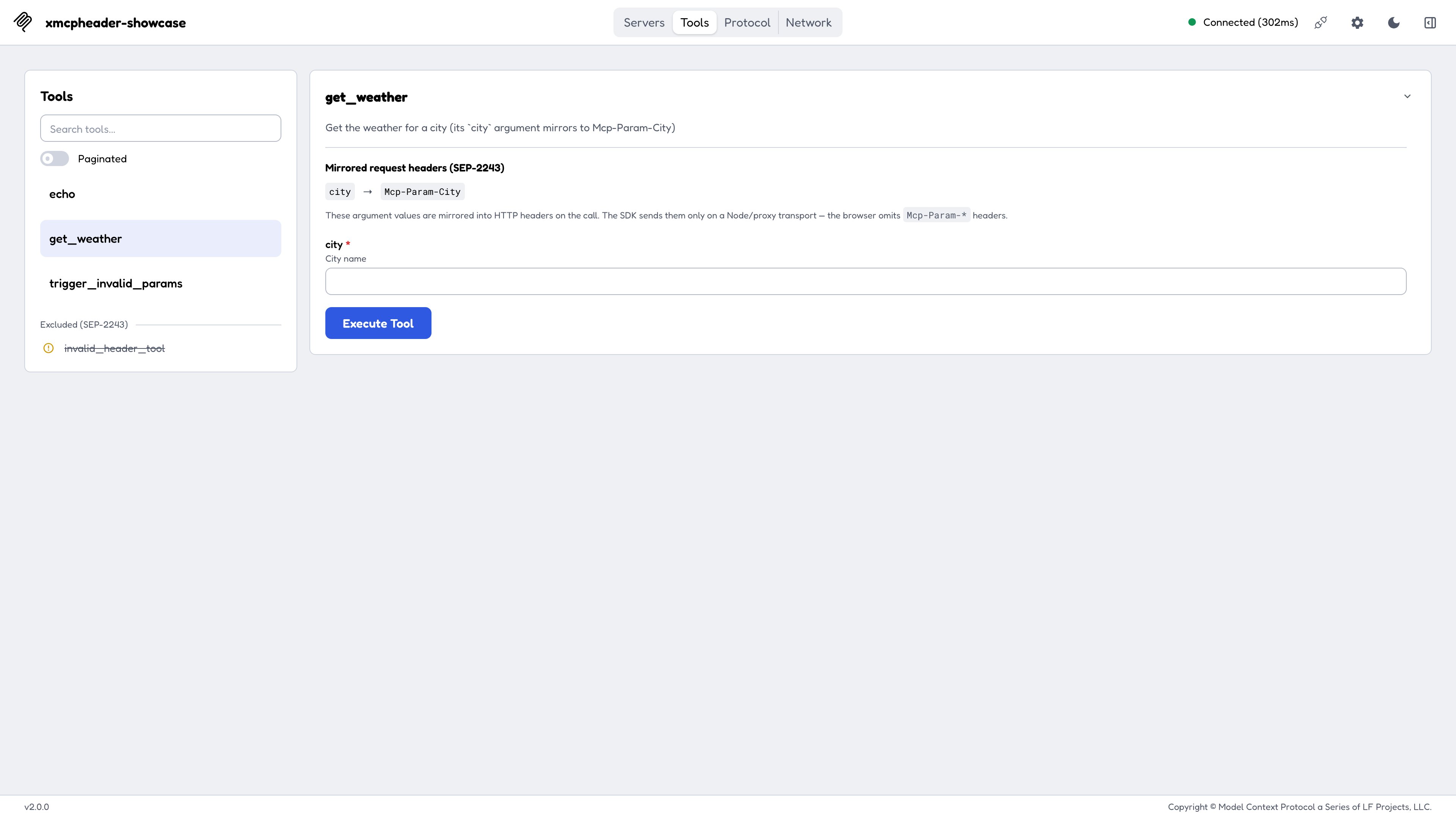
* A tool with a **valid** annotation shows a **"Mirrored request headers (SEP-2243)"** section in its detail panel, for example `city -> Mcp-Param-City`.
* A tool with an **invalid** annotation (say, a header name of `"Bad Header"`, where the space makes it an invalid RFC 9110 token) appears struck through in the sidebar under an **"Excluded (SEP-2243)"** divider, with the reason on hover. A conforming client MUST drop such a tool from `tools/list`; the Inspector shows you *why* it was dropped instead of silently hiding it.
Reproduce with `test-servers/configs/xmcpheader-modern-http.json`.
**`Mcp-Param-*` mirroring is skipped by the SDK in the browser.** Calling a
mirrored tool from the *web* client omits the header, so a strict server
answers `-32020` (`HeaderMismatch`, see the [error
taxonomy](#network-and-protocol-headers-and-the-error-taxonomy) below). The
same tool called from the **CLI** or **TUI**, which both run on Node, mirrors
correctly. The header is dropped by an environment check inside the SDK,
outside the Inspector's control.
***
## Tools: mirrored headers and excluded tools
[SEP-2243](/seps/2243-http-standardization) lets a tool annotate an argument with `x-mcp-header`, asking a Streamable HTTP client to mirror that argument's value into an `Mcp-Param-*` request header.
The Inspector surfaces both halves of that contract in the **Tools** tab:
* A tool with a **valid** annotation shows a **"Mirrored request headers (SEP-2243)"** section in its detail panel, for example `city -> Mcp-Param-City`.
* A tool with an **invalid** annotation (say, a header name of `"Bad Header"`, where the space makes it an invalid RFC 9110 token) appears struck through in the sidebar under an **"Excluded (SEP-2243)"** divider, with the reason on hover. A conforming client MUST drop such a tool from `tools/list`; the Inspector shows you *why* it was dropped instead of silently hiding it.
Reproduce with `test-servers/configs/xmcpheader-modern-http.json`.
**`Mcp-Param-*` mirroring is skipped by the SDK in the browser.** Calling a
mirrored tool from the *web* client omits the header, so a strict server
answers `-32020` (`HeaderMismatch`, see the [error
taxonomy](#network-and-protocol-headers-and-the-error-taxonomy) below). The
same tool called from the **CLI** or **TUI**, which both run on Node, mirrors
correctly. The header is dropped by an environment check inside the SDK,
outside the Inspector's control.
 ### `-32602` error panels
Under the modern era a `tools/call` that rejects with `-32602` renders as a distinct **error panel**:
* **Unknown Tool**: when the message names a tool the server does not list. Reproduce by calling any name absent from the server's `tools/list`.
* **Invalid Parameters**: any other `-32602`. Reproduce with the `trigger_invalid_params` tool in the config above.
Both eras reject with `-32602`; only the Inspector's presentation changes. On a legacy connection you get one generic JSON-RPC failure and have to read the message to tell which case you hit.
***
## Network and Protocol: headers and the error taxonomy
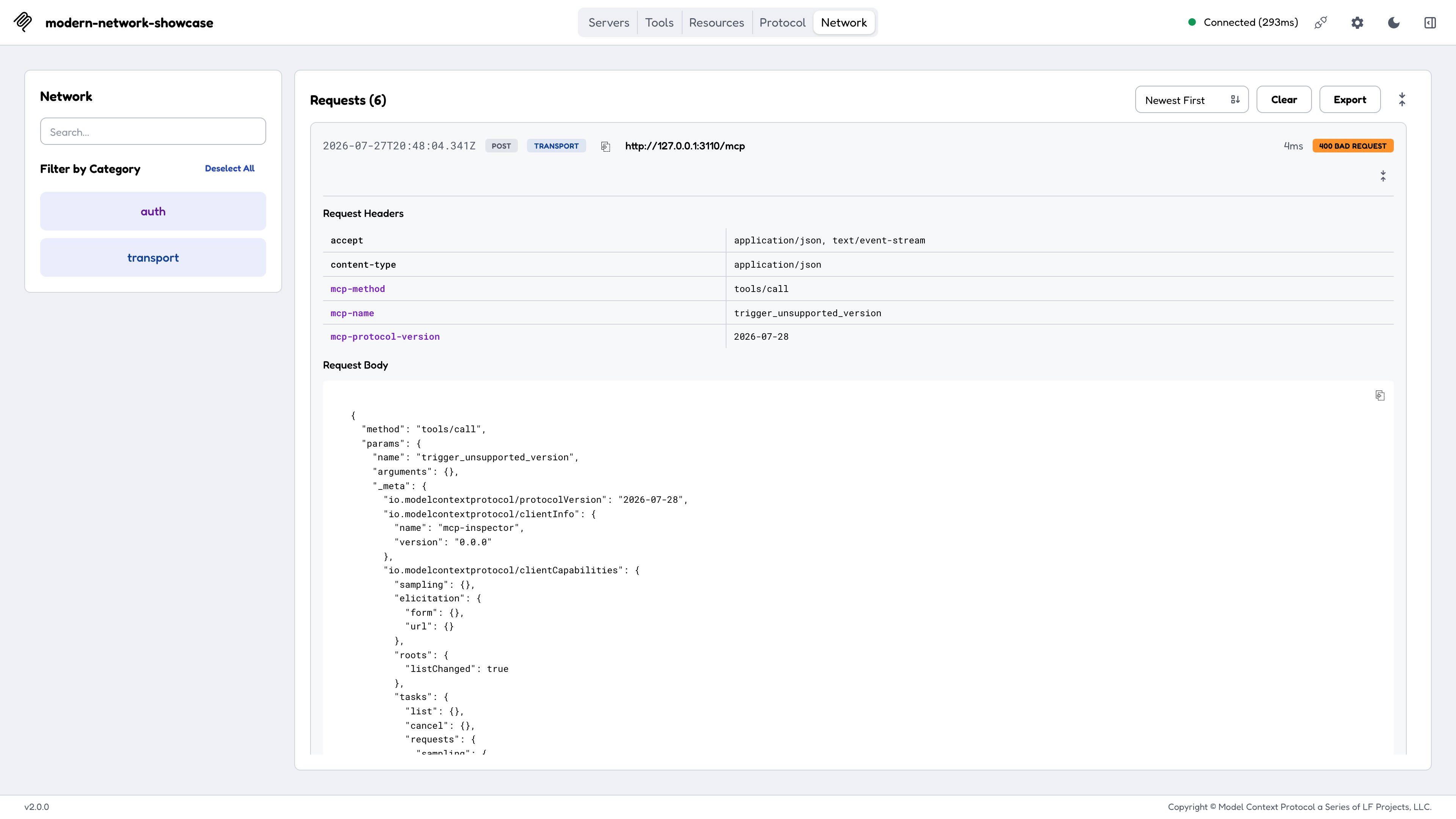
The modern era standardizes a set of `Mcp-*` HTTP headers and introduces a richer JSON-RPC error taxonomy ([SEP-2243](/seps/2243-http-standardization) / [SEP-2575](/seps/2575-stateless-mcp)). The two monitoring tabs divide the work:
* The **Network** tab is the HTTP view: mirrored `Mcp-*` headers are highlighted and sentinel values decoded.
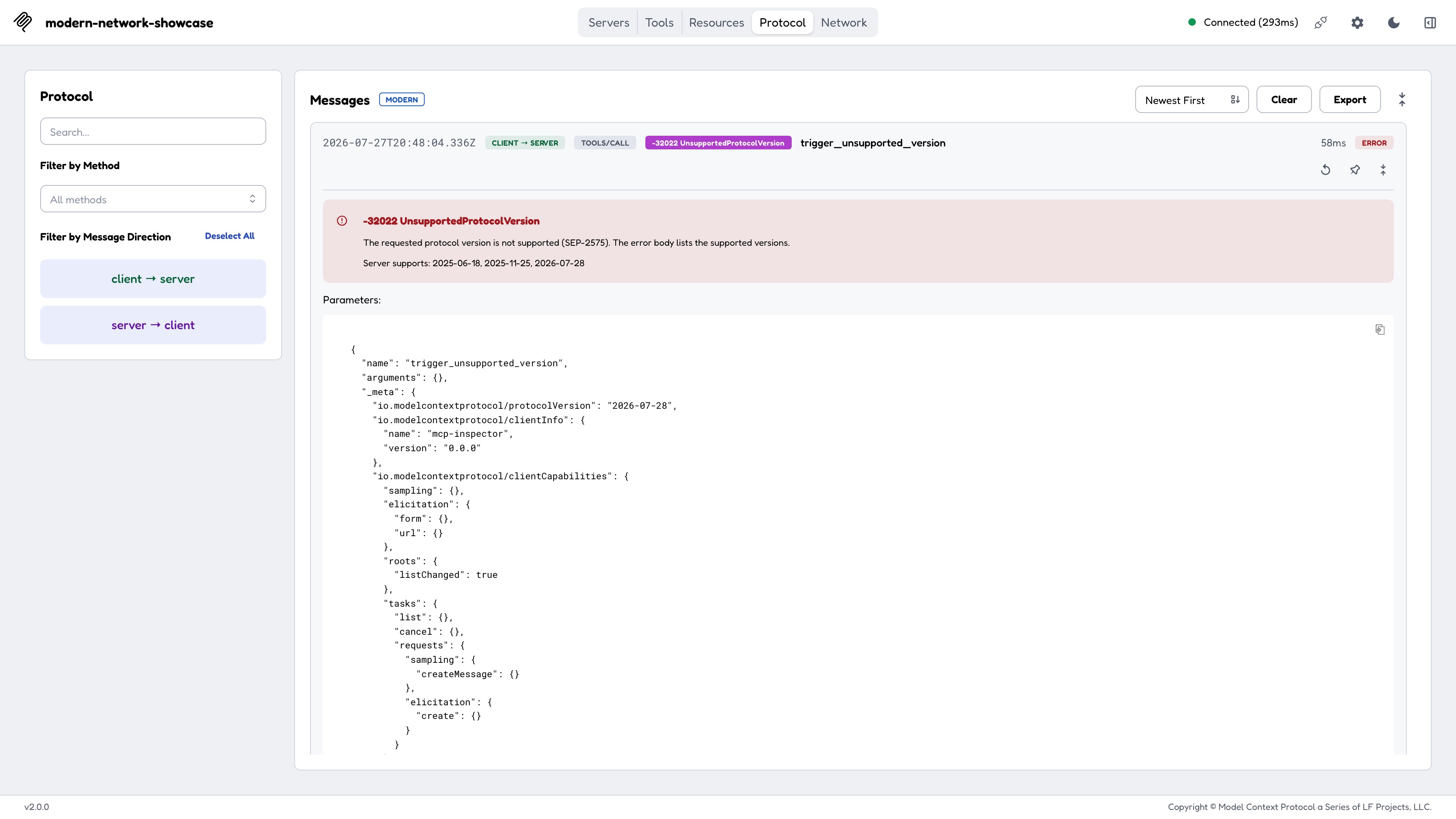
* The **Protocol** tab is the JSON-RPC view: each spec error renders distinctly rather than as a generic failure.
`test-servers/configs/modern-network-http.json` serves four tools that produce a real HTTP status plus a JSON-RPC error body, one per class:
| Tool | HTTP | JSON-RPC code | Meaning |
| ----------------------------- | ----- | ------------- | ------------------------------------------------------------ |
| `trigger_header_mismatch` | `400` | `-32020` | A required mirrored header was missing or wrong. |
| `trigger_missing_capability` | `400` | `-32021` | The request omitted a client capability the server requires. |
| `trigger_unsupported_version` | `400` | `-32022` | Unsupported version; supported versions in `data.supported`. |
| `trigger_method_not_found` | `404` | `-32601` | Method not found. |
### `-32602` error panels
Under the modern era a `tools/call` that rejects with `-32602` renders as a distinct **error panel**:
* **Unknown Tool**: when the message names a tool the server does not list. Reproduce by calling any name absent from the server's `tools/list`.
* **Invalid Parameters**: any other `-32602`. Reproduce with the `trigger_invalid_params` tool in the config above.
Both eras reject with `-32602`; only the Inspector's presentation changes. On a legacy connection you get one generic JSON-RPC failure and have to read the message to tell which case you hit.
***
## Network and Protocol: headers and the error taxonomy
The modern era standardizes a set of `Mcp-*` HTTP headers and introduces a richer JSON-RPC error taxonomy ([SEP-2243](/seps/2243-http-standardization) / [SEP-2575](/seps/2575-stateless-mcp)). The two monitoring tabs divide the work:
* The **Network** tab is the HTTP view: mirrored `Mcp-*` headers are highlighted and sentinel values decoded.
* The **Protocol** tab is the JSON-RPC view: each spec error renders distinctly rather than as a generic failure.
`test-servers/configs/modern-network-http.json` serves four tools that produce a real HTTP status plus a JSON-RPC error body, one per class:
| Tool | HTTP | JSON-RPC code | Meaning |
| ----------------------------- | ----- | ------------- | ------------------------------------------------------------ |
| `trigger_header_mismatch` | `400` | `-32020` | A required mirrored header was missing or wrong. |
| `trigger_missing_capability` | `400` | `-32021` | The request omitted a client capability the server requires. |
| `trigger_unsupported_version` | `400` | `-32022` | Unsupported version; supported versions in `data.supported`. |
| `trigger_method_not_found` | `404` | `-32601` | Method not found. |
 ***
## Sessions
A legacy Streamable HTTP connection may carry a server-assigned session id (`Mcp-Session-Id`), which the client tears down with an HTTP `DELETE`. A modern connection is **sessionless and per-request**: with no session id the client SDK sends no `DELETE` to the server, so disconnect is purely local.
This has a practical consequence for your own test servers. A stateless modern handler constructed per request cannot hold state between calls, which is why `test-servers/configs/subscriptions-modern-http.json`, unlike its legacy counterpart, omits an `update_resource` tool: the mutation would run against a throwaway server instance and be invisible to the next read.
***
## Sessions
A legacy Streamable HTTP connection may carry a server-assigned session id (`Mcp-Session-Id`), which the client tears down with an HTTP `DELETE`. A modern connection is **sessionless and per-request**: with no session id the client SDK sends no `DELETE` to the server, so disconnect is purely local.
This has a practical consequence for your own test servers. A stateless modern handler constructed per request cannot hold state between calls, which is why `test-servers/configs/subscriptions-modern-http.json`, unlike its legacy counterpart, omits an `update_resource` tool: the mutation would run against a throwaway server instance and be invisible to the next read.