> ## Documentation Index
> Fetch the complete documentation index at: https://modelcontextprotocol.io/llms.txt
> Use this file to discover all available pages before exploring further.
# Web client
> A tab-by-tab walkthrough of the graphical MCP Inspector
The web client is the Inspector's richest surface: a single-page app backed by a small Node server that owns the actual MCP connections. It is the default mode, so `npx @modelcontextprotocol/inspector` with no mode flag lands here.
```bash theme={null}
npx @modelcontextprotocol/inspector # empty, add servers in the UI
npx @modelcontextprotocol/inspector node build/index.js # with an ad-hoc stdio server
npx @modelcontextprotocol/inspector --catalog ./mcp.json # with a catalog file
```
## The session token
The Node server behind the web client guards every `/api/*` route with a per-launch token, because it can spawn processes on your machine. The launcher prints a URL containing that token: **open that URL**, and don't type `localhost:6274` from memory.
The browser recovers the token from three places, in priority order:
1. `window.__INSPECTOR_API_TOKEN__`, injected into `index.html` on every page load. This is what makes a bare-URL reload or a bookmark keep working.
2. A `?MCP_INSPECTOR_API_TOKEN=...` query string, the form used in that printed URL.
3. `sessionStorage`, as a backstop.
Set the `MCP_INSPECTOR_API_TOKEN` environment variable to pin a known token (useful for scripted launches), or set `DANGEROUSLY_OMIT_AUTH=true` to disable the check entirely, but only on a machine where nothing else can reach the port. Both are described under [Web backend environment variables](/docs/draft/tools/inspector/configuration#web-backend-environment-variables).
## Dev mode
`--dev` is a **web-only** flag. It runs the Vite dev server instead of serving the pre-built bundle, which matters if you're working on the Inspector itself:
```bash theme={null}
mcp-inspector --web --dev
```
Production `--web` serves a built bundle. In the published package that bundle always ships; in a fresh source checkout it doesn't, so the runner builds it on demand the first time you launch.
## The tab bar
| Tab | Shown when | What it does |
| ------------- | --------------------------------------------------------------------- | ------------------------------------------------------------------------------ |
| **Servers** | Always | The server list: add, edit, import, connect, and open per-server settings. |
| **Apps** | The server exposes MCP App tools | Renders a tool's UI in a sandboxed frame. |
| **Tools** | `tools` capability | Browse schemas, fill arguments, call, inspect results. |
| **Prompts** | `prompts` capability | List prompts, supply arguments, preview generated messages. |
| **Resources** | `resources` capability | Browse, read, and subscribe to resources. |
| **Tasks** | `capabilities.tasks` (legacy era) or the tasks extension (modern era) | Track long-running tool calls. |
| **Logs** | `logging` capability | Server `notifications/message` output, plus the era-appropriate level control. |
| **Protocol** | Always | The JSON-RPC transcript: requests, responses, notifications. |
| **Network** | HTTP / SSE servers | The raw HTTP view: status, headers, bodies. |
| **Console** | stdio servers | The server process's `stderr`. |
**Network** and **Console** never appear together. Legacy and modern eras are described in [Protocol eras](/docs/draft/tools/inspector/protocol-eras).
 ### The monitoring sidebar
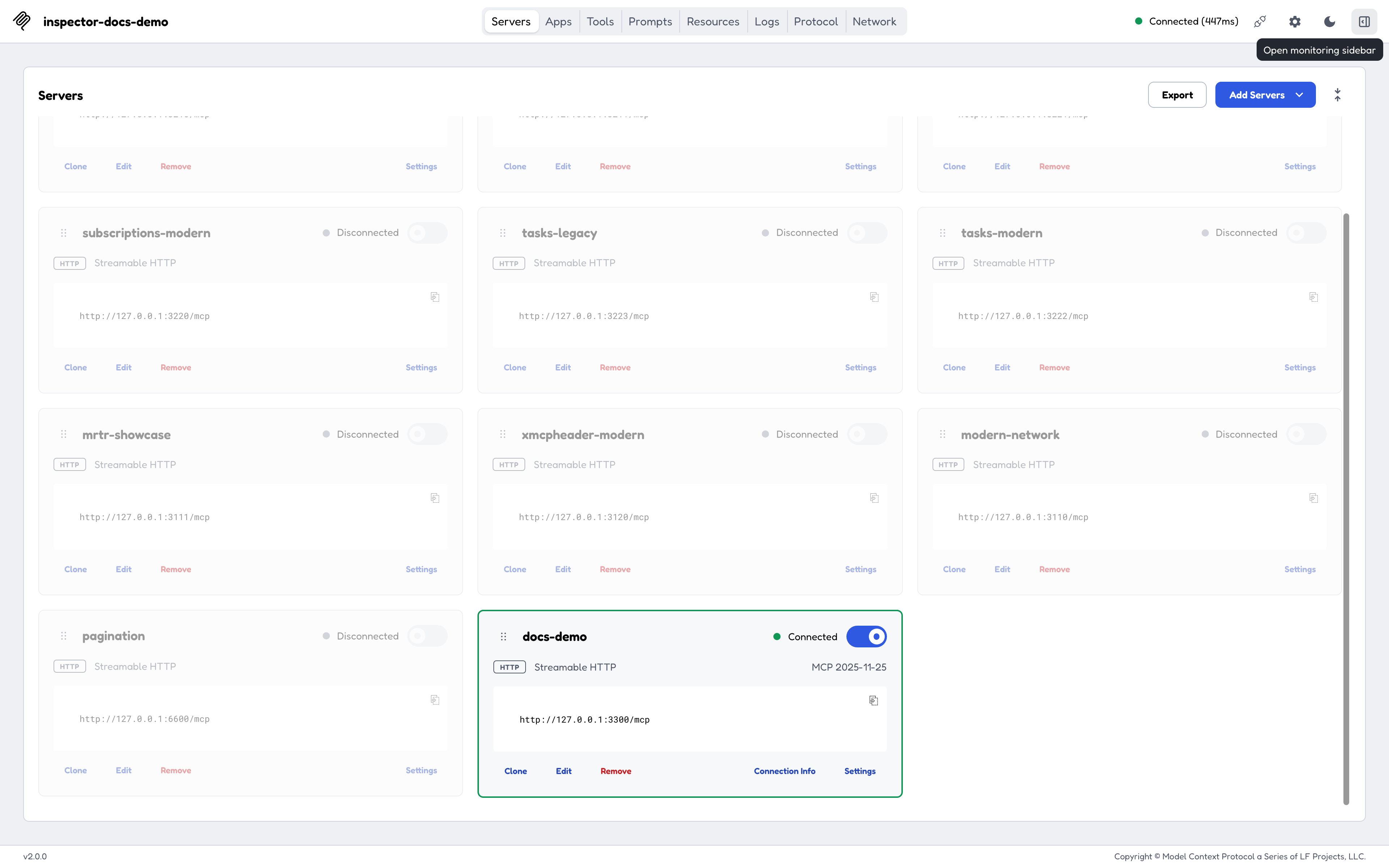
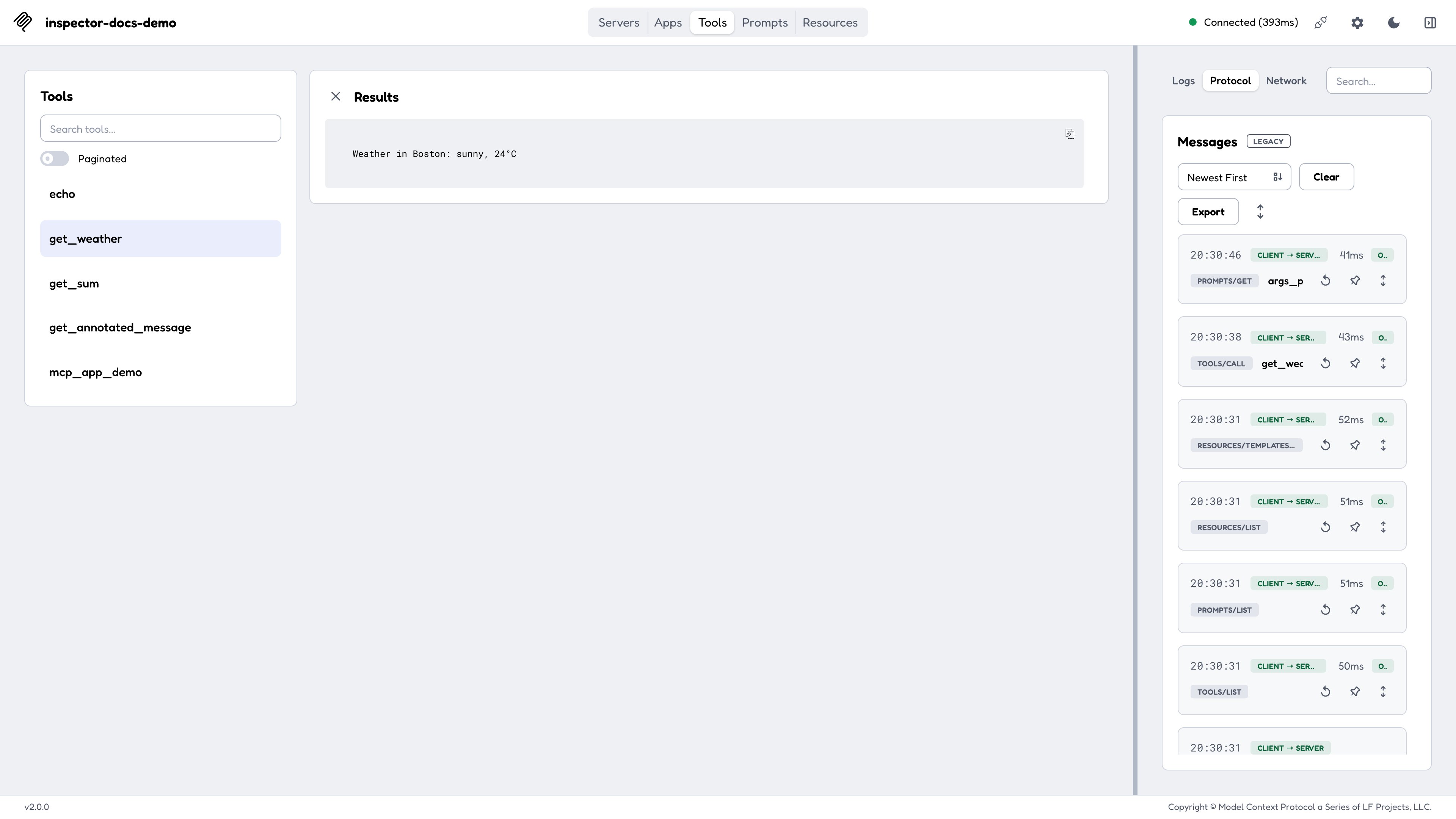
**Tasks**, **Logs**, **Protocol**, **Network**, and **Console** form a *monitor group*. Pin the group and they leave the tab bar and move into a resizable right-hand column, so you can watch traffic while working in Tools or Resources. The column width and the selected monitor tab persist across reloads.
### The monitoring sidebar
**Tasks**, **Logs**, **Protocol**, **Network**, and **Console** form a *monitor group*. Pin the group and they leave the tab bar and move into a resizable right-hand column, so you can watch traffic while working in Tools or Resources. The column width and the selected monitor tab persist across reloads.
 ## Servers
The Servers screen is the entry point. A server row carries its transport, its connection state, and a control that opens its per-server settings.
Where that list comes from, and whether it's editable, depends on how you launched:
| Launch | Server list | Editable? |
| -------------------------------------------- | ----------------------------------------------------------------------- | --------- |
| `mcp-inspector --web` | The default catalog `~/.mcp-inspector/mcp.json`, seeded on first launch | Yes |
| `--catalog ` | That file, seeded with the sample servers if missing | Yes |
| `--config ` | That file, read-only (never written or seeded) | No |
| `--server-url ` or a positional command | One ad-hoc server, held in memory | No |
On a first launch the web client seeds the catalog with two sample servers: a filesystem server scoped to `/tmp` and the canonical "everything" reference server. See [Configuration and flags](/docs/draft/tools/inspector/configuration) for the full rules, including why the CLI and TUI seed an empty catalog instead.
### Server Settings
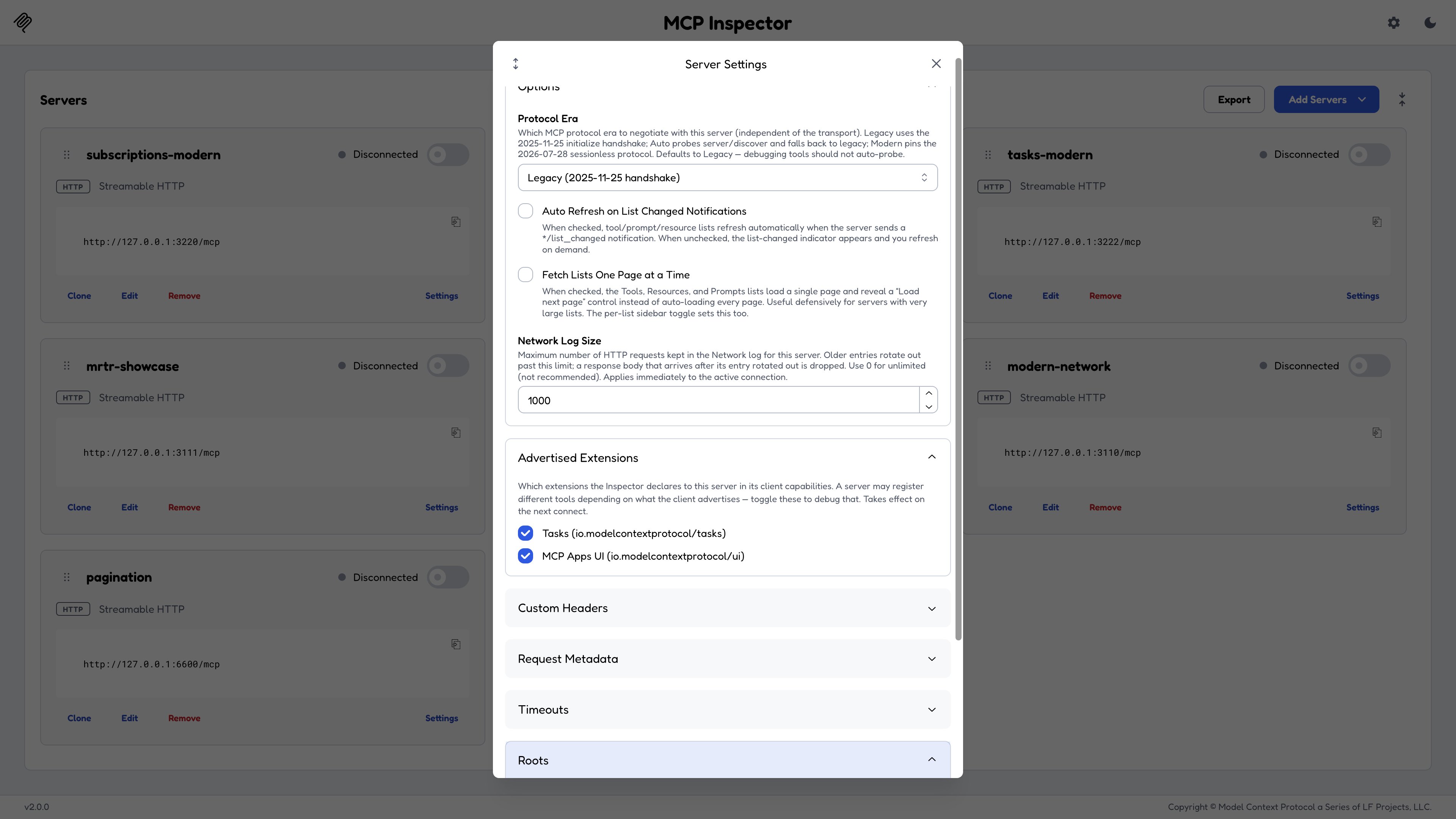
* **Protocol Era**: `legacy` / `auto` / `modern`. See [Protocol eras](/docs/draft/tools/inspector/protocol-eras).
* **Log level per request**: the level a modern-era connection stamps on each outgoing request by default, or `off` to opt out (see [Logging](/docs/draft/tools/inspector/protocol-eras#logging)).
* **Advertised Extensions**: which extensions the Inspector declares in `capabilities.extensions`. A debugging knob: a server may legitimately change what it registers based on what you advertise. Uncheck the Tasks extension and reconnect against the `test-servers/configs/advertised-extensions-http.json` fixture (setup in [Reproducing each era locally](/docs/draft/tools/inspector/protocol-eras#reproducing-each-era-locally)) to watch a tool disappear.
* **Roots**: the roots advertised via the `roots` client capability. `@modelcontextprotocol/server-filesystem`, for instance, calls `roots/list` to learn its allowed directories.
* **Headers**, **timeouts**, and **OAuth** fields.
* **Fetch lists one page at a time**: when off, list results are auto-aggregated across pages on connect; when on, each list loads page 1 only with a **Load next page** control and an *N pages loaded* status. Reproduce with `test-servers/configs/pagination-http.json`, which paginates 12 tools, resources, and prompts into three pages each.
## Servers
The Servers screen is the entry point. A server row carries its transport, its connection state, and a control that opens its per-server settings.
Where that list comes from, and whether it's editable, depends on how you launched:
| Launch | Server list | Editable? |
| -------------------------------------------- | ----------------------------------------------------------------------- | --------- |
| `mcp-inspector --web` | The default catalog `~/.mcp-inspector/mcp.json`, seeded on first launch | Yes |
| `--catalog ` | That file, seeded with the sample servers if missing | Yes |
| `--config ` | That file, read-only (never written or seeded) | No |
| `--server-url ` or a positional command | One ad-hoc server, held in memory | No |
On a first launch the web client seeds the catalog with two sample servers: a filesystem server scoped to `/tmp` and the canonical "everything" reference server. See [Configuration and flags](/docs/draft/tools/inspector/configuration) for the full rules, including why the CLI and TUI seed an empty catalog instead.
### Server Settings
* **Protocol Era**: `legacy` / `auto` / `modern`. See [Protocol eras](/docs/draft/tools/inspector/protocol-eras).
* **Log level per request**: the level a modern-era connection stamps on each outgoing request by default, or `off` to opt out (see [Logging](/docs/draft/tools/inspector/protocol-eras#logging)).
* **Advertised Extensions**: which extensions the Inspector declares in `capabilities.extensions`. A debugging knob: a server may legitimately change what it registers based on what you advertise. Uncheck the Tasks extension and reconnect against the `test-servers/configs/advertised-extensions-http.json` fixture (setup in [Reproducing each era locally](/docs/draft/tools/inspector/protocol-eras#reproducing-each-era-locally)) to watch a tool disappear.
* **Roots**: the roots advertised via the `roots` client capability. `@modelcontextprotocol/server-filesystem`, for instance, calls `roots/list` to learn its allowed directories.
* **Headers**, **timeouts**, and **OAuth** fields.
* **Fetch lists one page at a time**: when off, list results are auto-aggregated across pages on connect; when on, each list loads page 1 only with a **Load next page** control and an *N pages loaded* status. Reproduce with `test-servers/configs/pagination-http.json`, which paginates 12 tools, resources, and prompts into three pages each.
 ## Tools
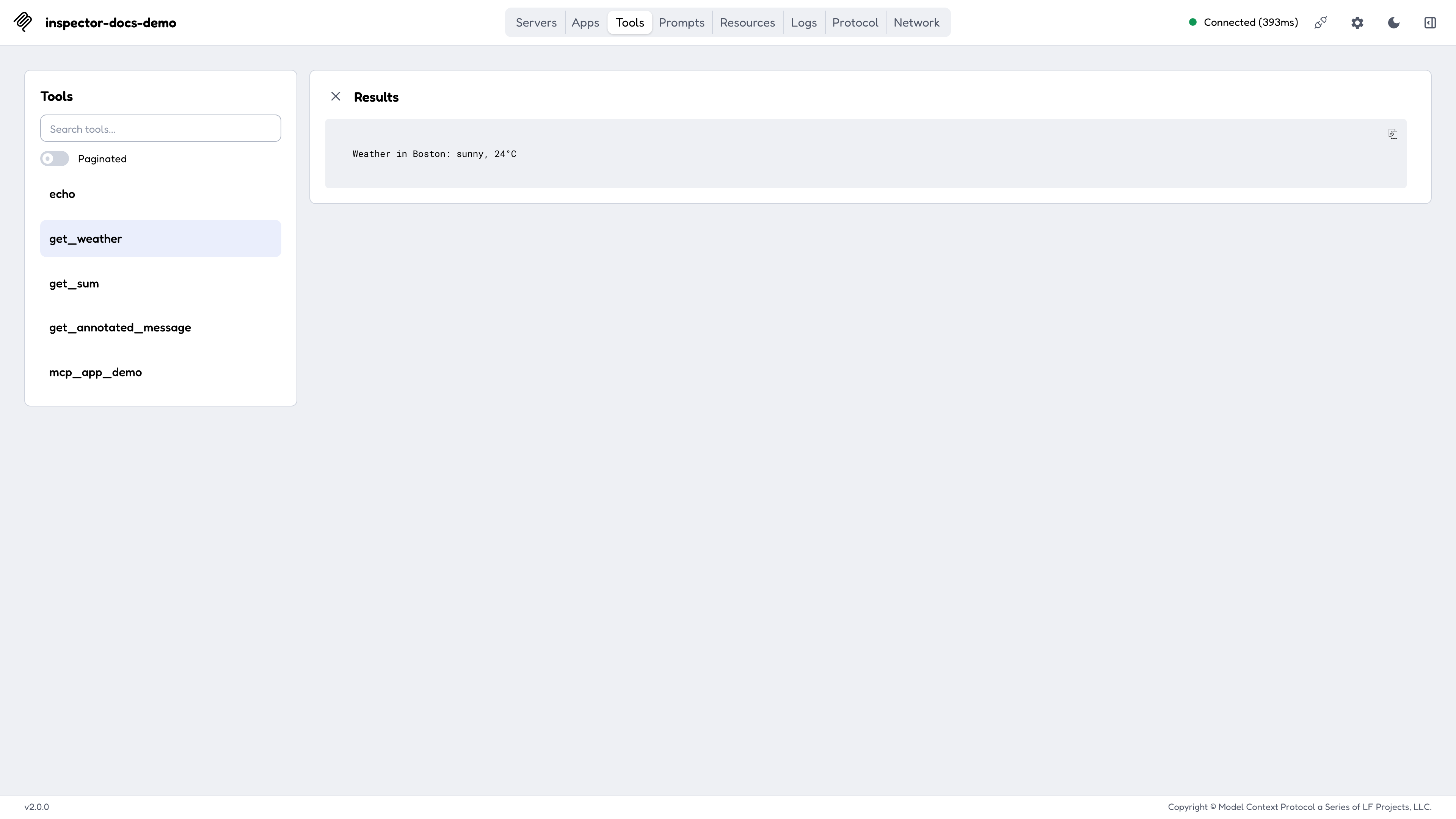
Select a tool to see its description, its input schema rendered as a form, and its annotations. Fill the form and call it; the result renders below with structured content, embedded resources, and images handled natively.
On modern-era servers this screen also shows mirrored `Mcp-Param-*` headers, excluded tools, and distinct `-32602` error panels, all covered in [Protocol eras](/docs/draft/tools/inspector/protocol-eras#tools-mirrored-headers-and-excluded-tools).
## Tools
Select a tool to see its description, its input schema rendered as a form, and its annotations. Fill the form and call it; the result renders below with structured content, embedded resources, and images handled natively.
On modern-era servers this screen also shows mirrored `Mcp-Param-*` headers, excluded tools, and distinct `-32602` error panels, all covered in [Protocol eras](/docs/draft/tools/inspector/protocol-eras#tools-mirrored-headers-and-excluded-tools).
 ## Resources
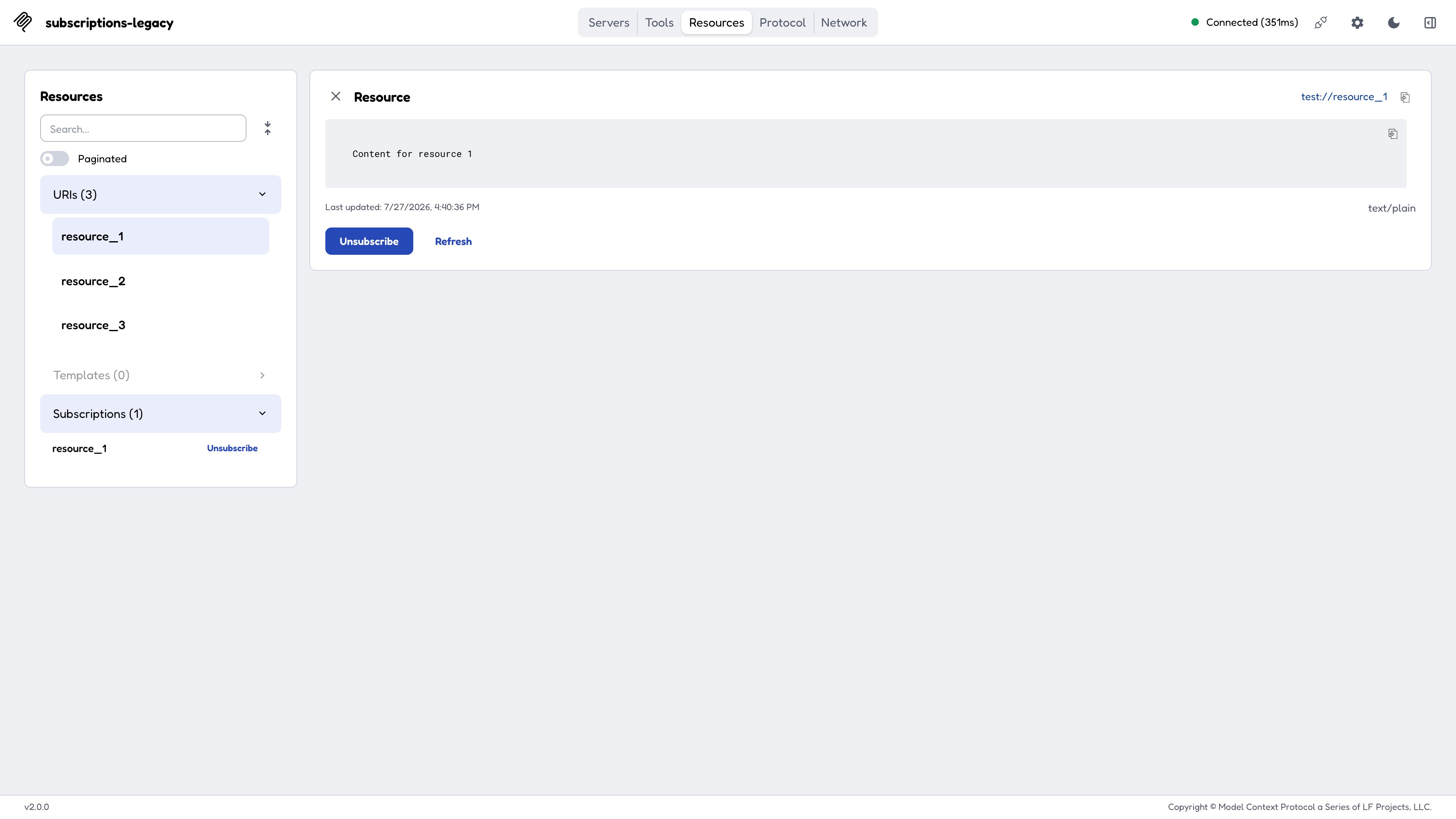
Lists resources and resource templates with their MIME types and descriptions, reads content on selection, and offers **Subscribe** on servers that support subscriptions. The subscription mechanics differ by era; see [Resource subscriptions](/docs/draft/tools/inspector/protocol-eras#resource-subscriptions).
## Resources
Lists resources and resource templates with their MIME types and descriptions, reads content on selection, and offers **Subscribe** on servers that support subscriptions. The subscription mechanics differ by era; see [Resource subscriptions](/docs/draft/tools/inspector/protocol-eras#resource-subscriptions).
 ## Prompts
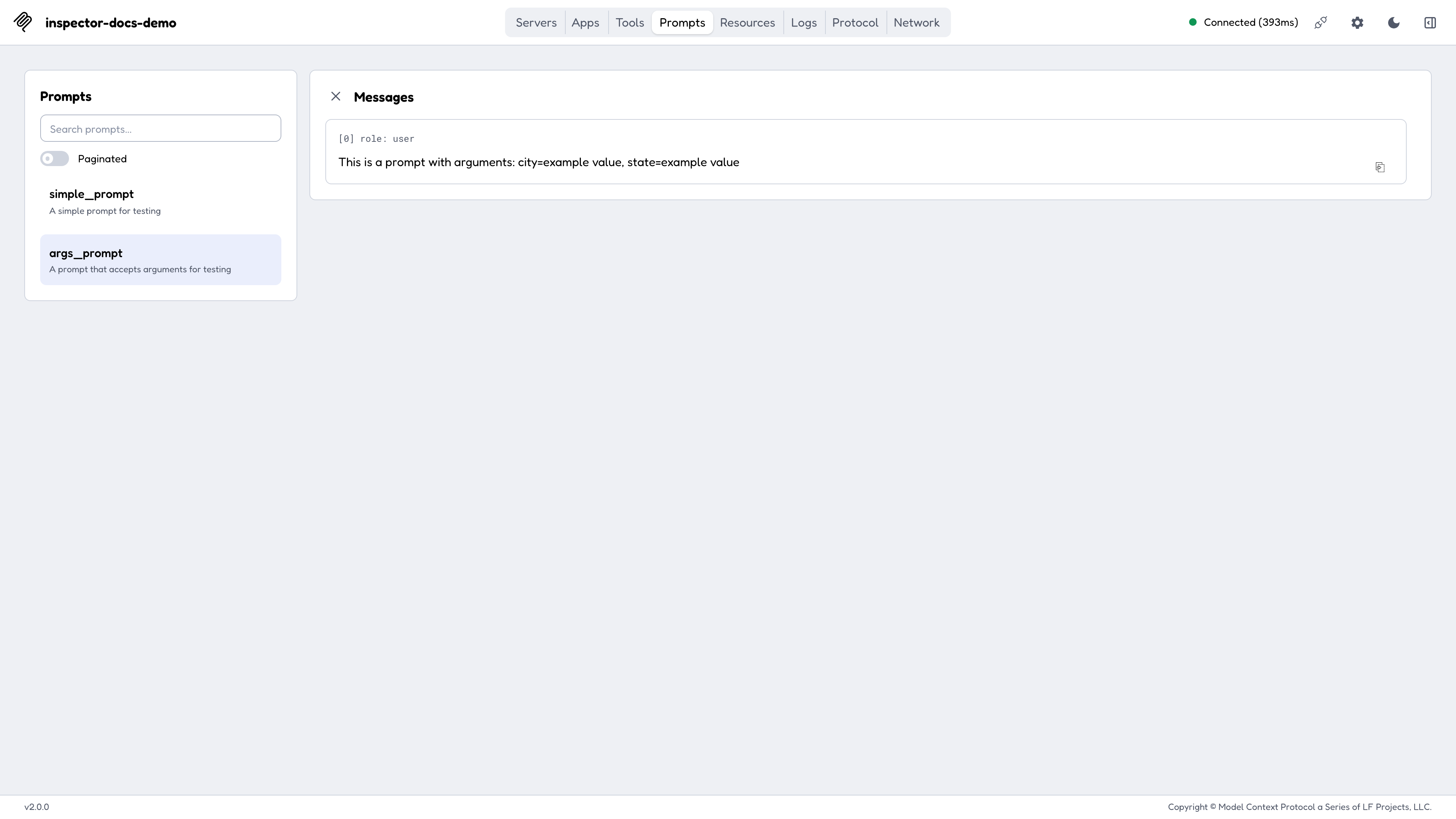
Lists prompt templates with their arguments, and renders the generated messages for the arguments you supply, which is the fastest way to confirm a prompt produces what you intended.
## Prompts
Lists prompt templates with their arguments, and renders the generated messages for the arguments you supply, which is the fastest way to confirm a prompt produces what you intended.
 ## Apps
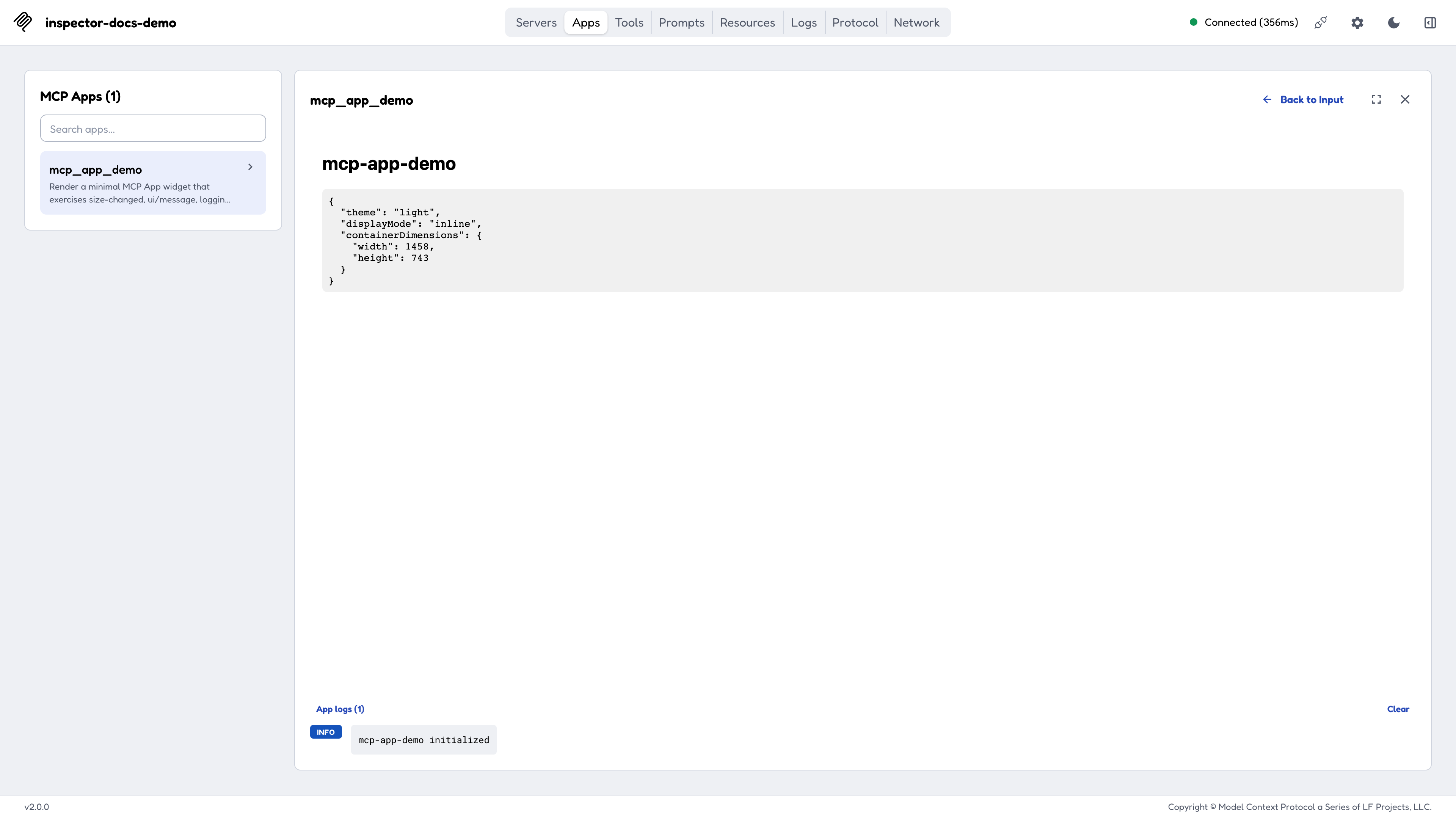
[MCP Apps](/extensions/apps/overview) are tools that carry UI. The Apps tab renders one in a sandboxed iframe served from a **separate port**, exercises the `ui/*` bridge, and shows the view's `ui/message` submissions and its `notifications/message` logs in side panels.
* The sandbox port is dynamic by default; pin it with `MCP_SANDBOX_PORT` if you need to expose or forward it.
* The sandbox is gated by a `frame-ancestors` CSP, and a bracketed IPv6 literal is not a valid CSP host-source, so browse the Inspector at `localhost`, `127.0.0.1`, a hostname, or a LAN IPv4, **not** at a bare `http://[::1]:...`.
* The sandbox URL is always plain `http`, so an `https://` Inspector page blocks the frame as mixed content. MCP Apps need a plain-`http` origin today.
See [Recipes](/docs/draft/tools/inspector/recipes#reviewing-an-mcp-app) for the CLI-first automated review flow.
## Apps
[MCP Apps](/extensions/apps/overview) are tools that carry UI. The Apps tab renders one in a sandboxed iframe served from a **separate port**, exercises the `ui/*` bridge, and shows the view's `ui/message` submissions and its `notifications/message` logs in side panels.
* The sandbox port is dynamic by default; pin it with `MCP_SANDBOX_PORT` if you need to expose or forward it.
* The sandbox is gated by a `frame-ancestors` CSP, and a bracketed IPv6 literal is not a valid CSP host-source, so browse the Inspector at `localhost`, `127.0.0.1`, a hostname, or a LAN IPv4, **not** at a bare `http://[::1]:...`.
* The sandbox URL is always plain `http`, so an `https://` Inspector page blocks the frame as mixed content. MCP Apps need a plain-`http` origin today.
See [Recipes](/docs/draft/tools/inspector/recipes#reviewing-an-mcp-app) for the CLI-first automated review flow.
 ## Protocol, Network, and Console
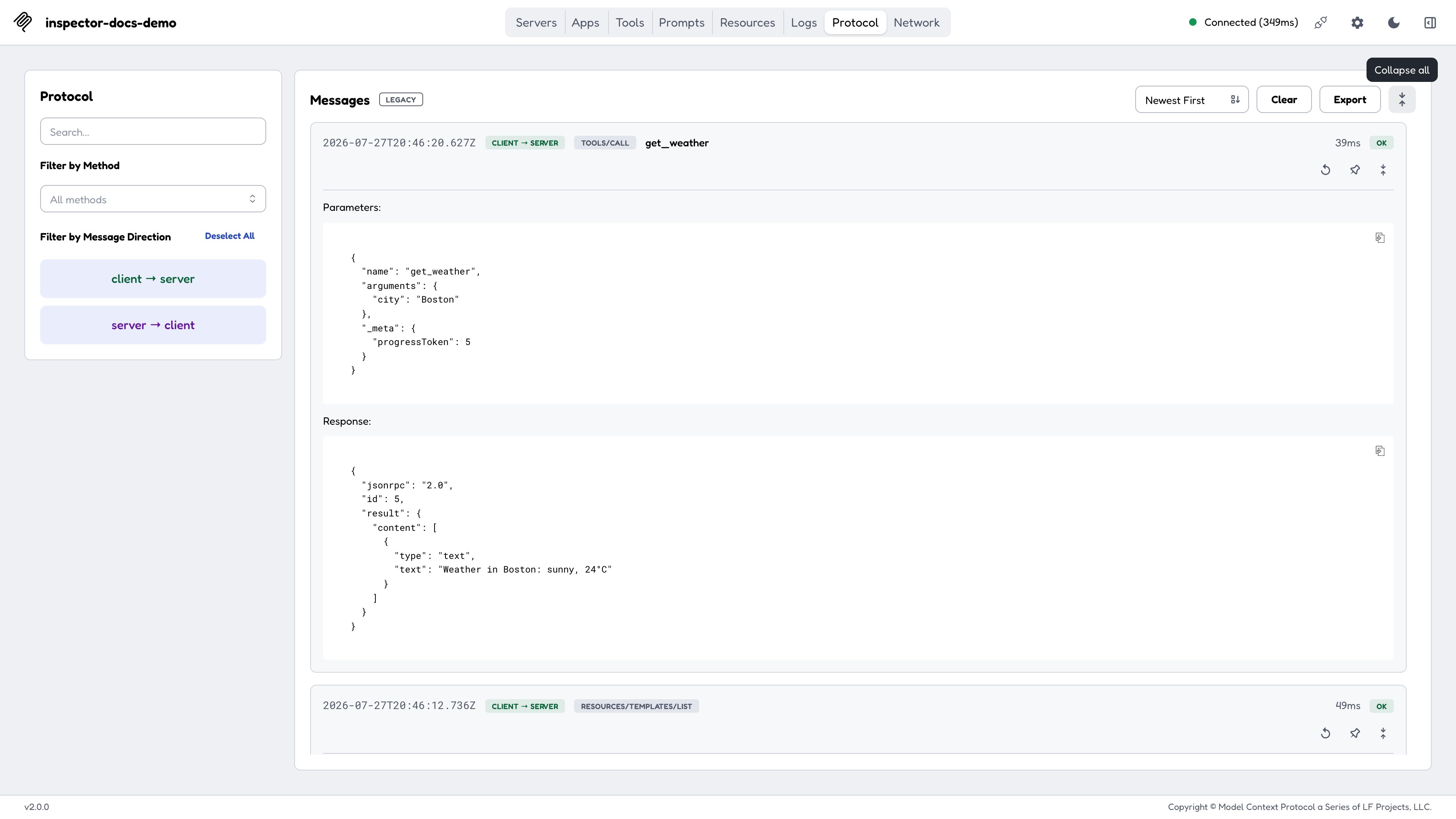
The three tabs show the same traffic at different levels of detail:
* **Protocol**: the JSON-RPC transcript. Requests paired with responses, notifications inline, [MRTR](/docs/draft/tools/inspector/protocol-eras#multi-round-tool-results-mrtr) rounds grouped as one conversation, and spec errors rendered by class.
* **Network**: the HTTP layer, for SSE and Streamable HTTP servers. Status codes, request and response headers, and bodies. On modern connections the standardized `Mcp-*` headers are highlighted and sentinel values decoded.
* **Console**: the connected stdio server process's `stderr`, which is where most stdio servers put their own diagnostics.
Secrets are masked in these views, and entries can be cleared or exported.
## Protocol, Network, and Console
The three tabs show the same traffic at different levels of detail:
* **Protocol**: the JSON-RPC transcript. Requests paired with responses, notifications inline, [MRTR](/docs/draft/tools/inspector/protocol-eras#multi-round-tool-results-mrtr) rounds grouped as one conversation, and spec errors rendered by class.
* **Network**: the HTTP layer, for SSE and Streamable HTTP servers. Status codes, request and response headers, and bodies. On modern connections the standardized `Mcp-*` headers are highlighted and sentinel values decoded.
* **Console**: the connected stdio server process's `stderr`, which is where most stdio servers put their own diagnostics.
Secrets are masked in these views, and entries can be cleared or exported.
 ## Deep links
A driver (a script, a CI harness, or the CLI's [`--print-handoff`](/docs/draft/tools/inspector/authorization#handing-off-from-the-web-client-to-the-cli)) can reach a *connected* Inspector with a single navigation:
```
http://127.0.0.1:6274/?serverUrl=&transport=http|sse&autoConnect=
```
| Parameter | Meaning |
| ------------- | -------------------------------------------------------------------------------------------------------------- |
| `serverUrl` | The MCP server URL. Restricted to `http:` / `https:`; a crafted `javascript:` or `file:` value is rejected. |
| `transport` | `http` (default) or `sse`. |
| `autoConnect` | **Required CSRF gate.** Must equal the per-launch session token, which only whatever started the server knows. |
Three further parameters land you on a *rendered app*: `openApp=` names the tool, `appArgs=` supplies its arguments (merged over the tool's schema defaults), and `autoOpen=` fires the tool call automatically. Because `autoOpen` fires a call, it carries the same mandatory token gate as `autoConnect`.
## Host binding and origins
By default the Inspector binds `localhost` and accepts requests only from the loopback origins for its port. Treat both defaults as security boundaries, since the backend spawns processes on your machine.
Binding all interfaces (`HOST=0.0.0.0`) is **refused** unless you set `DANGEROUSLY_BIND_ALL_INTERFACES=true`. Binding a *specific* non-loopback address is allowed with no opt-in, since that's a single deliberate exposure rather than every interface at once.
See the [Hosting on a network](/docs/draft/tools/inspector/recipes#hosting-on-a-network) recipe for the full matrix, and [Configuration](/docs/draft/tools/inspector/configuration#web-backend-environment-variables) for the variables.
## Deep links
A driver (a script, a CI harness, or the CLI's [`--print-handoff`](/docs/draft/tools/inspector/authorization#handing-off-from-the-web-client-to-the-cli)) can reach a *connected* Inspector with a single navigation:
```
http://127.0.0.1:6274/?serverUrl=&transport=http|sse&autoConnect=
```
| Parameter | Meaning |
| ------------- | -------------------------------------------------------------------------------------------------------------- |
| `serverUrl` | The MCP server URL. Restricted to `http:` / `https:`; a crafted `javascript:` or `file:` value is rejected. |
| `transport` | `http` (default) or `sse`. |
| `autoConnect` | **Required CSRF gate.** Must equal the per-launch session token, which only whatever started the server knows. |
Three further parameters land you on a *rendered app*: `openApp=` names the tool, `appArgs=` supplies its arguments (merged over the tool's schema defaults), and `autoOpen=` fires the tool call automatically. Because `autoOpen` fires a call, it carries the same mandatory token gate as `autoConnect`.
## Host binding and origins
By default the Inspector binds `localhost` and accepts requests only from the loopback origins for its port. Treat both defaults as security boundaries, since the backend spawns processes on your machine.
Binding all interfaces (`HOST=0.0.0.0`) is **refused** unless you set `DANGEROUSLY_BIND_ALL_INTERFACES=true`. Binding a *specific* non-loopback address is allowed with no opt-in, since that's a single deliberate exposure rather than every interface at once.
See the [Hosting on a network](/docs/draft/tools/inspector/recipes#hosting-on-a-network) recipe for the full matrix, and [Configuration](/docs/draft/tools/inspector/configuration#web-backend-environment-variables) for the variables.