> ## Documentation Index
> Fetch the complete documentation index at: https://modelcontextprotocol.io/llms.txt
> Use this file to discover all available pages before exploring further.
# Prompts
**Protocol Revision**: 2025-11-25
The Model Context Protocol (MCP) provides a standardized way for servers to expose prompt
templates to clients. Prompts allow servers to provide structured messages and
instructions for interacting with language models. Clients can discover available
prompts, retrieve their contents, and provide arguments to customize them.
## User Interaction Model
Prompts are designed to be **user-controlled**, meaning they are exposed from servers to
clients with the intention of the user being able to explicitly select them for use.
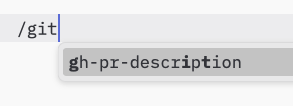
Typically, prompts would be triggered through user-initiated commands in the user
interface, which allows users to naturally discover and invoke available prompts.
For example, as slash commands:
 However, implementors are free to expose prompts through any interface pattern that suits
their needs—the protocol itself does not mandate any specific user interaction
model.
## Capabilities
Servers that support prompts **MUST** declare the `prompts` capability during
[initialization](/specification/2025-11-25/basic/lifecycle#initialization):
```json theme={null}
{
"capabilities": {
"prompts": {
"listChanged": true
}
}
}
```
`listChanged` indicates whether the server will emit notifications when the list of
available prompts changes.
## Protocol Messages
### Listing Prompts
To retrieve available prompts, clients send a `prompts/list` request. This operation
supports [pagination](/specification/2025-11-25/server/utilities/pagination).
**Request:**
```json theme={null}
{
"jsonrpc": "2.0",
"id": 1,
"method": "prompts/list",
"params": {
"cursor": "optional-cursor-value"
}
}
```
**Response:**
```json theme={null}
{
"jsonrpc": "2.0",
"id": 1,
"result": {
"prompts": [
{
"name": "code_review",
"title": "Request Code Review",
"description": "Asks the LLM to analyze code quality and suggest improvements",
"arguments": [
{
"name": "code",
"description": "The code to review",
"required": true
}
],
"icons": [
{
"src": "https://example.com/review-icon.svg",
"mimeType": "image/svg+xml",
"sizes": ["any"]
}
]
}
],
"nextCursor": "next-page-cursor"
}
}
```
### Getting a Prompt
To retrieve a specific prompt, clients send a `prompts/get` request. Arguments may be
auto-completed through [the completion API](/specification/2025-11-25/server/utilities/completion).
**Request:**
```json theme={null}
{
"jsonrpc": "2.0",
"id": 2,
"method": "prompts/get",
"params": {
"name": "code_review",
"arguments": {
"code": "def hello():\n print('world')"
}
}
}
```
**Response:**
```json theme={null}
{
"jsonrpc": "2.0",
"id": 2,
"result": {
"description": "Code review prompt",
"messages": [
{
"role": "user",
"content": {
"type": "text",
"text": "Please review this Python code:\ndef hello():\n print('world')"
}
}
]
}
}
```
### List Changed Notification
When the list of available prompts changes, servers that declared the `listChanged`
capability **SHOULD** send a notification:
```json theme={null}
{
"jsonrpc": "2.0",
"method": "notifications/prompts/list_changed"
}
```
## Message Flow
```mermaid theme={null}
sequenceDiagram
participant Client
participant Server
Note over Client,Server: Discovery
Client->>Server: prompts/list
Server-->>Client: List of prompts
Note over Client,Server: Usage
Client->>Server: prompts/get
Server-->>Client: Prompt content
opt listChanged
Note over Client,Server: Changes
Server--)Client: prompts/list_changed
Client->>Server: prompts/list
Server-->>Client: Updated prompts
end
```
## Data Types
### Prompt
A prompt definition includes:
* `name`: Unique identifier for the prompt
* `title`: Optional human-readable name of the prompt for display purposes.
* `description`: Optional human-readable description
* `icons`: Optional array of icons for display in user interfaces
* `arguments`: Optional list of arguments for customization
### PromptMessage
Messages in a prompt can contain:
* `role`: Either "user" or "assistant" to indicate the speaker
* `content`: One of the following content types:
All content types in prompt messages support optional
[annotations](./resources#annotations) for metadata about audience, priority,
and modification times.
#### Text Content
Text content represents plain text messages:
```json theme={null}
{
"type": "text",
"text": "The text content of the message"
}
```
This is the most common content type used for natural language interactions.
#### Image Content
Image content allows including visual information in messages:
```json theme={null}
{
"type": "image",
"data": "base64-encoded-image-data",
"mimeType": "image/png"
}
```
The image data **MUST** be base64-encoded and include a valid MIME type. This enables
multi-modal interactions where visual context is important.
#### Audio Content
Audio content allows including audio information in messages:
```json theme={null}
{
"type": "audio",
"data": "base64-encoded-audio-data",
"mimeType": "audio/wav"
}
```
The audio data MUST be base64-encoded and include a valid MIME type. This enables
multi-modal interactions where audio context is important.
#### Embedded Resources
Embedded resources allow referencing server-side resources directly in messages:
```json theme={null}
{
"type": "resource",
"resource": {
"uri": "resource://example",
"mimeType": "text/plain",
"text": "Resource content"
}
}
```
Resources can contain either text or binary (blob) data and **MUST** include:
* A valid resource URI
* The appropriate MIME type
* Either text content or base64-encoded blob data
Embedded resources enable prompts to seamlessly incorporate server-managed content like
documentation, code samples, or other reference materials directly into the conversation
flow.
## Error Handling
Servers **SHOULD** return standard JSON-RPC errors for common failure cases:
* Invalid prompt name: `-32602` (Invalid params)
* Missing required arguments: `-32602` (Invalid params)
* Internal errors: `-32603` (Internal error)
## Implementation Considerations
1. Servers **SHOULD** validate prompt arguments before processing
2. Clients **SHOULD** handle pagination for large prompt lists
3. Both parties **SHOULD** respect capability negotiation
## Security
Implementations **MUST** carefully validate all prompt inputs and outputs to prevent
injection attacks or unauthorized access to resources.
However, implementors are free to expose prompts through any interface pattern that suits
their needs—the protocol itself does not mandate any specific user interaction
model.
## Capabilities
Servers that support prompts **MUST** declare the `prompts` capability during
[initialization](/specification/2025-11-25/basic/lifecycle#initialization):
```json theme={null}
{
"capabilities": {
"prompts": {
"listChanged": true
}
}
}
```
`listChanged` indicates whether the server will emit notifications when the list of
available prompts changes.
## Protocol Messages
### Listing Prompts
To retrieve available prompts, clients send a `prompts/list` request. This operation
supports [pagination](/specification/2025-11-25/server/utilities/pagination).
**Request:**
```json theme={null}
{
"jsonrpc": "2.0",
"id": 1,
"method": "prompts/list",
"params": {
"cursor": "optional-cursor-value"
}
}
```
**Response:**
```json theme={null}
{
"jsonrpc": "2.0",
"id": 1,
"result": {
"prompts": [
{
"name": "code_review",
"title": "Request Code Review",
"description": "Asks the LLM to analyze code quality and suggest improvements",
"arguments": [
{
"name": "code",
"description": "The code to review",
"required": true
}
],
"icons": [
{
"src": "https://example.com/review-icon.svg",
"mimeType": "image/svg+xml",
"sizes": ["any"]
}
]
}
],
"nextCursor": "next-page-cursor"
}
}
```
### Getting a Prompt
To retrieve a specific prompt, clients send a `prompts/get` request. Arguments may be
auto-completed through [the completion API](/specification/2025-11-25/server/utilities/completion).
**Request:**
```json theme={null}
{
"jsonrpc": "2.0",
"id": 2,
"method": "prompts/get",
"params": {
"name": "code_review",
"arguments": {
"code": "def hello():\n print('world')"
}
}
}
```
**Response:**
```json theme={null}
{
"jsonrpc": "2.0",
"id": 2,
"result": {
"description": "Code review prompt",
"messages": [
{
"role": "user",
"content": {
"type": "text",
"text": "Please review this Python code:\ndef hello():\n print('world')"
}
}
]
}
}
```
### List Changed Notification
When the list of available prompts changes, servers that declared the `listChanged`
capability **SHOULD** send a notification:
```json theme={null}
{
"jsonrpc": "2.0",
"method": "notifications/prompts/list_changed"
}
```
## Message Flow
```mermaid theme={null}
sequenceDiagram
participant Client
participant Server
Note over Client,Server: Discovery
Client->>Server: prompts/list
Server-->>Client: List of prompts
Note over Client,Server: Usage
Client->>Server: prompts/get
Server-->>Client: Prompt content
opt listChanged
Note over Client,Server: Changes
Server--)Client: prompts/list_changed
Client->>Server: prompts/list
Server-->>Client: Updated prompts
end
```
## Data Types
### Prompt
A prompt definition includes:
* `name`: Unique identifier for the prompt
* `title`: Optional human-readable name of the prompt for display purposes.
* `description`: Optional human-readable description
* `icons`: Optional array of icons for display in user interfaces
* `arguments`: Optional list of arguments for customization
### PromptMessage
Messages in a prompt can contain:
* `role`: Either "user" or "assistant" to indicate the speaker
* `content`: One of the following content types:
All content types in prompt messages support optional
[annotations](./resources#annotations) for metadata about audience, priority,
and modification times.
#### Text Content
Text content represents plain text messages:
```json theme={null}
{
"type": "text",
"text": "The text content of the message"
}
```
This is the most common content type used for natural language interactions.
#### Image Content
Image content allows including visual information in messages:
```json theme={null}
{
"type": "image",
"data": "base64-encoded-image-data",
"mimeType": "image/png"
}
```
The image data **MUST** be base64-encoded and include a valid MIME type. This enables
multi-modal interactions where visual context is important.
#### Audio Content
Audio content allows including audio information in messages:
```json theme={null}
{
"type": "audio",
"data": "base64-encoded-audio-data",
"mimeType": "audio/wav"
}
```
The audio data MUST be base64-encoded and include a valid MIME type. This enables
multi-modal interactions where audio context is important.
#### Embedded Resources
Embedded resources allow referencing server-side resources directly in messages:
```json theme={null}
{
"type": "resource",
"resource": {
"uri": "resource://example",
"mimeType": "text/plain",
"text": "Resource content"
}
}
```
Resources can contain either text or binary (blob) data and **MUST** include:
* A valid resource URI
* The appropriate MIME type
* Either text content or base64-encoded blob data
Embedded resources enable prompts to seamlessly incorporate server-managed content like
documentation, code samples, or other reference materials directly into the conversation
flow.
## Error Handling
Servers **SHOULD** return standard JSON-RPC errors for common failure cases:
* Invalid prompt name: `-32602` (Invalid params)
* Missing required arguments: `-32602` (Invalid params)
* Internal errors: `-32603` (Internal error)
## Implementation Considerations
1. Servers **SHOULD** validate prompt arguments before processing
2. Clients **SHOULD** handle pagination for large prompt lists
3. Both parties **SHOULD** respect capability negotiation
## Security
Implementations **MUST** carefully validate all prompt inputs and outputs to prevent
injection attacks or unauthorized access to resources.