

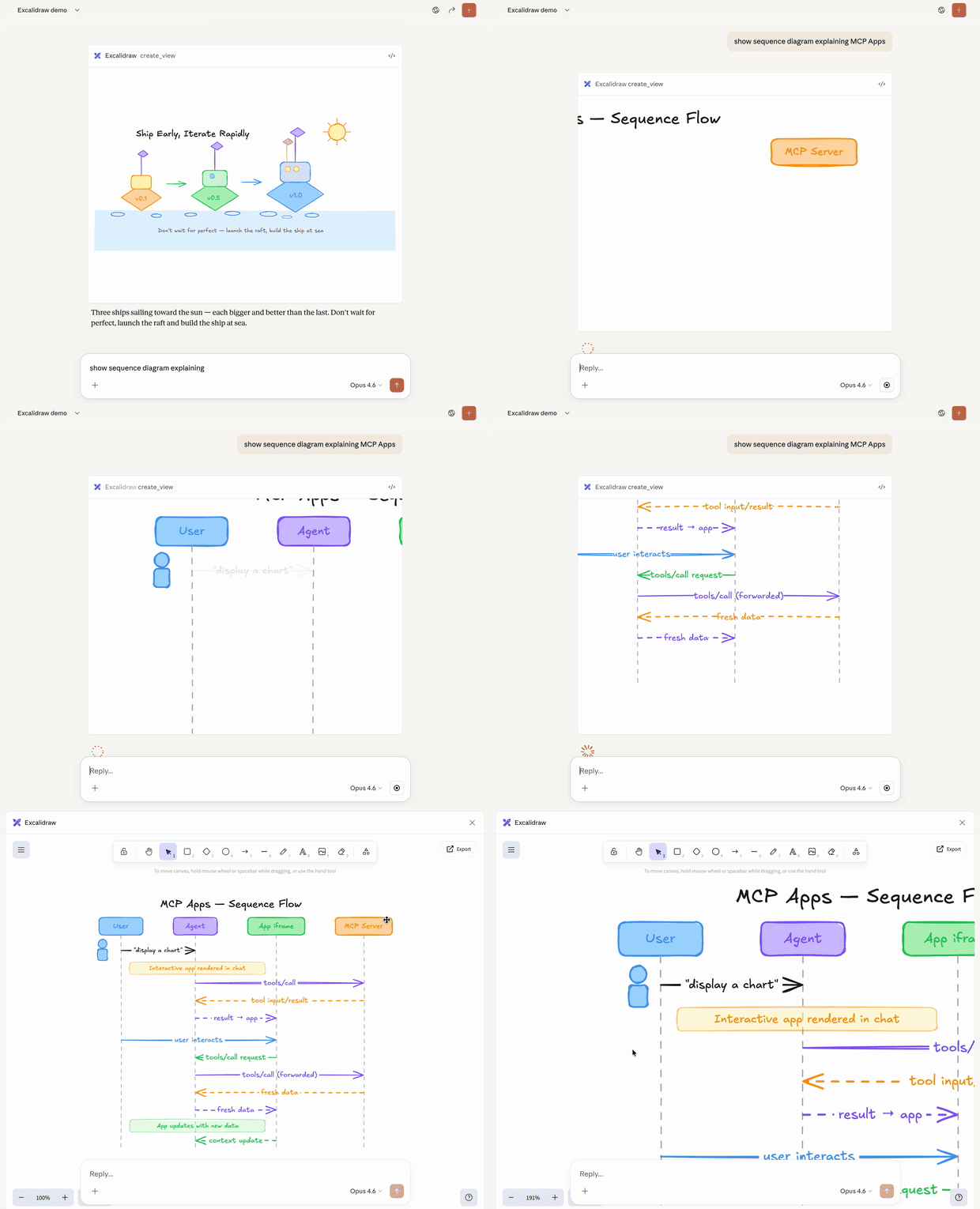
Excalidraw MCP App, running in Claude
Why not just build a web app?
You could build a standalone web app and send users a link. However, MCP Apps offer these key advantages that a separate page can’t match:- Context preservation. The app lives inside the conversation. Users don’t switch tabs, lose their place, or wonder which chat thread had that dashboard. The UI is right there, alongside the discussion that led to it.
- Bidirectional data flow. Your app can call any tool on the MCP server, and the host can push fresh results to your app. A standalone web app would need its own API, authentication, and state management. MCP Apps get this via existing MCP patterns.
- Integration with the host’s capabilities. The app can delegate actions to the host, which can then invoke the capabilities and tools the user has already connected (subject to user consent). Instead of every app implementing and maintaining direct integrations (e.g., email providers), the app can request an outcome (like “schedule this meeting”), and the host routes it through the user’s existing connected capabilities.
- Security guarantees. MCP Apps run in a sandboxed iframe controlled by the host. They can’t access the parent page, steal cookies, or escape their container. This means hosts can safely render third-party apps without trusting the server author completely.
How MCP Apps work
Traditional MCP tools return text, images, resources or structured data that the host displays as part of the conversation. MCP Apps extend this pattern by allowing tools to declare a reference to an interactive UI in their tool description that the host renders in place. The core pattern combines two MCP primitives: a tool that declares a UI resource in its description, plus a UI resource that renders data as an interactive HTML interface. When a large language model (LLM) decides to call a tool that supports MCP Apps, here’s what happens:-
UI preloading: The tool description includes a
_meta.ui.resourceUrifield pointing to aui://resource. The host can preload this resource before the tool is even called, enabling features like streaming tool inputs to the app. -
Resource fetch: The host fetches the UI resource from the server. This
resource contains an HTML page, often bundled with its JavaScript and CSS for
simplicity. Apps can also load external scripts and resources from origins
specified in
_meta.ui.csp. -
Sandboxed rendering: Web hosts typically render the HTML inside a
sandboxed iframe
within the conversation. The sandbox restricts the app’s access to the parent
page, ensuring security. The resource’s
_meta.uiobject can includepermissionsto request additional capabilities (e.g., microphone, camera) andcspto control what external origins the app can load resources from. -
Bidirectional communication: The app and host communicate through a
JSON-RPC protocol that forms its own dialect of MCP. Some requests and
notifications are shared with the core MCP protocol (e.g.,
tools/call), some are similar (e.g.,ui/initialize), and most are new with aui/method name prefix. The app can request tool calls, send messages, update the model’s context, and receive data from the host.
When to use MCP Apps
MCP Apps are a good fit when your use case involves: Exploring complex data. A user asks “show me sales by region.” A text response might list numbers, but an MCP App can render an interactive map where users click regions to drill down, hover for details, and toggle between metrics, all without additional prompts. Configuring with many options. Setting up a deployment involves dozens of interdependent choices. Rather than a back-and-forth conversation (“Which region?” “What instance size?” “Enable autoscaling?”), an MCP App presents a form where users see all options at once, with validation and defaults. Viewing rich media. When a user asks to review a PDF, see a 3D model, or preview generated images, text descriptions fall short. An MCP App embeds the actual viewer (pan, zoom, rotate) directly in the conversation. Real-time monitoring. A dashboard showing live metrics, logs, or system status needs continuous updates. An MCP App maintains a persistent connection, updating the display as data changes without requiring the user to ask “what’s the status now?” Multi-step workflows. Approving expense reports, reviewing code changes, or triaging issues involves examining items one by one. An MCP App provides navigation controls, action buttons, and state that persists across interactions.Security model
MCP Apps run in a sandboxed iframe, which provides strong isolation from the host application. The sandbox prevents your app from accessing the parent window’s DOM, reading the host’s cookies or local storage, navigating the parent page, or executing scripts in the parent context. All communication between your app and the host goes through the postMessage API. The host controls which capabilities your app can access. For example, a host might restrict which tools an app can call or disable thesendOpenLink capability.
The sandbox is designed to prevent apps from escaping to access the host or user data.
Framework support
MCP Apps use their own dialect of MCP, built on JSON-RPC like the core protocol. Some messages are shared with regular MCP (e.g.,tools/call), while others are
specific to apps (e.g., ui/initialize). The transport is
postMessage
instead of stdio or HTTP. Since it’s all standard web primitives, you can use any
framework or none at all.
The App class from @modelcontextprotocol/ext-apps is a convenience wrapper,
not a requirement. You can implement the
postMessage protocol
directly if you prefer to avoid dependencies or need tighter control.
The examples directory
includes starter templates for React, Vue, Svelte, Preact, Solid, and vanilla
JavaScript. These demonstrate recommended patterns for each framework’s system,
but they’re examples rather than requirements. You can choose whatever works
best for your use case.
Client support
MCP Apps is an extension to the core MCP specification. Host support varies by client.
-
Use a framework: The
@mcp-ui/clientpackage provides React components for rendering and interacting with MCP Apps views in your host application. See the MCP-UI documentation for usage details. - Build on AppBridge: The SDK includes an App Bridge module that handles rendering apps in sandboxed iframes, message passing, tool call proxying, and security policy enforcement. The basic-host example shows how to integrate it.
Examples
The ext-apps repository includes ready-to-run examples demonstrating different use cases:- 3D and visualization: map-server (CesiumJS globe), threejs-server (Three.js scenes), shadertoy-server (shader effects)
- Data exploration: cohort-heatmap-server, customer-segmentation-server, wiki-explorer-server
- Business applications: scenario-modeler-server, budget-allocator-server
- Media: pdf-server, video-resource-server, sheet-music-server, say-server (text-to-speech)
- Utilities: qr-server, system-monitor-server, transcript-server (speech-to-text)
- Starter templates: React, Vue, Svelte, Preact, Solid, vanilla JavaScript